Is your Bonsaii shredder suddenly unresponsive, jammed, or making strange noises? You are not alone. Thousands of users face power failures, paper jams, and sensor errors every year, and many of these issues can be resolved at home without professional help. Over 90% of “dead” Bonsaii shredders come back to life with simple resets, cleaning, or lubrication. This guide delivers step-by-step repair solutions directly from technical diagnostics and real-world user success stories. Whether your unit will not turn on, keeps jamming, or flashes warning lights, you will learn exactly how to diagnose and fix your Bonsaii shredder quickly.
We will cover power troubleshooting, jam removal tricks, sensor resets, proper lubrication, and when to contact support so you can extend your shredder is life and avoid unnecessary replacements.
Power Failure Diagnosis

If your Bonsaii shredder will not turn on, start with external causes before assuming internal damage. Most power issues stem from the outlet, circuit, or safety sensors, not the motor itself.
Test Outlet and Circuit Breaker
First, confirm the wall outlet is live. Plug in a lamp or phone charger. If nothing powers up, check your home is electrical panel. A tripped circuit breaker is a common cause. Reset the switch for that circuit. Some outlets have a built-in red reset button between the prongs. Press it firmly if present. Always test the outlet first because replacing a functional shredder due to a dead outlet is a costly mistake.
Check Power Switch and Cord
Ensure the power cord is fully inserted into both the wall and the shredder. A loose connection cuts power silently. Then, locate the physical power switch on the back of the unit. It may have been bumped to Off. Flip it to On and try the machine. If the switch feels loose or unresponsive, the internal wiring may be damaged. Proceed to reset steps.
Reset After Overheating
Bonsaii shredders shut down automatically after 15 to 20 minutes of continuous use. This thermal protection prevents motor burnout. If the unit stops suddenly and the power light flashes, it is overheated. Unplug immediately. Wait 30 to 60 minutes for full cooling. Do not force operation. After cooldown, plug in and test. Refer to your manual because some models need the full hour.
Perform Full Power Cycle
Electrical glitches can lock the control board. A complete discharge fixes this. Unplug the shredder. Wait 30 to 40 minutes because this drains internal capacitors. Many users report dead units reboot after this delay. Plug back in and test. If the power light returns, the issue was electronic memory, not hardware failure.
Clear Paper Jams Safely
Jams are the number one mechanical issue. Forcing paper through worsens the blockage. Always unplug before clearing.
Use Reverse Mode First
If the unit still has power, press the REV or reverse button in short bursts. This often pulls jammed paper backward. Do not hold it down because if the motor strains, stop. Forcing it can damage gears.
Remove Paper with Tools
With the shredder unplugged, use tweezers or needle-nose pliers to extract visible paper from the feed slot. Avoid metal picks or knives because they scratch or dull blades. Pull gently. If paper tears, use a vacuum hose to remove fragments deep inside.
Clean Blades and Sensors
Paper dust builds up and causes friction. After removing the bulk, vacuum around the blades and inside the chamber. Then, wipe the feed sensor, usually a small lens in the center of the slot, with a dry cloth. A dirty sensor mimics a jam and disables operation.
Try the Sensor Trick Method
If the machine will not respond, the sensor may be blind. Insert a paper towel, cardboard scrap, or clump of paper into the feed slot. Try feeding it forward, then reverse. For stubborn units, feed from the side of the slot. This bypasses sensor dead zones and tricks the optical beam into restarting the motor cycle.
Fix Model Specific Jams (C275-A)
The Bonsaii C275-A is prone to severe jams. Do not disassemble because it voids the warranty and risks blade damage.
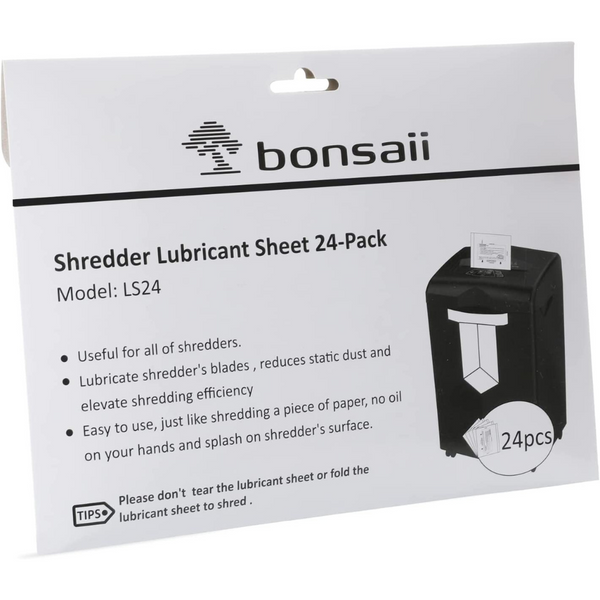
Apply Lubricant to Loosen Fibers
Drip a few drops of vegetable oil or shredder oil directly onto the blades. Let sit for 5 to 10 minutes. The oil softens compacted paper. After waiting, plug in and use short reverse bursts. Never force forward motion.
Avoid Disassembly
This model is not user-serviceable. Opening the casing risks cutting wires or misaligning gears. If oil and reverse fail, the motor may be stalled. Contact Bonsaii support and do not attempt internal repairs.
Lubricate for Smooth Operation
Dry blades cause noise, jams, and motor strain. Lubrication is preventive maintenance, not just a fix.
Know When to Oil
Lubricate every 10 to 15 uses or when you notice slower shredding, louder grinding noises, frequent jams, or a faint burning smell. These are signs of friction. Regular oiling extends motor life and prevents overheating.
Use Proper Lubricants
Best options include shredder-specific oil or pre-oiled sheets. Apply as directed, usually by feeding an oil sheet through.
Alternative options include a few drops of vegetable oil on a piece of paper. Run it through in reverse mode. This is effective in emergencies but not long-term.
WD-40 Cleaning Hack (C169-B)
For the Bonsaii C169-B, WD-40 can deep-clean and lubricate. Power off and unplug. Spray short bursts into the feed slot. Watch internal wheels spin freely because this clears residue.
For deep scrub, use a 3mm-thick card like a cereal box. Apply WD-40 to the card, insert slowly 2 to 3 times. This removes old fibers and prevents jams for up to one month.
Use lightly because over-spraying attracts dust.
Clean Sensors and Prevent False Errors
Dirt on sensors causes phantom jams, constant running, or no response.
Identify Sensor Locations
The feed sensor is located in the center of the paper slot and detects input. The bin sensor is inside the waste bin housing and triggers the full bin light. The safety interlock is a white button on the side or base and ensures the head is locked.
Clean with Dry Cloth
Wipe sensors weekly with a dry, lint-free cloth. No liquids. Dust blocks the optical beam, making the machine think it is jammed or full.
Reset Safety Interlock
If the unit will not start, check the bin. Remove it, empty completely, and reseat until it clicks. Then, locate the small white reset button, which may require tilting the unit. Press it 5 to 6 times to free any stuck mechanism.
Decode Indicator Lights and Errors
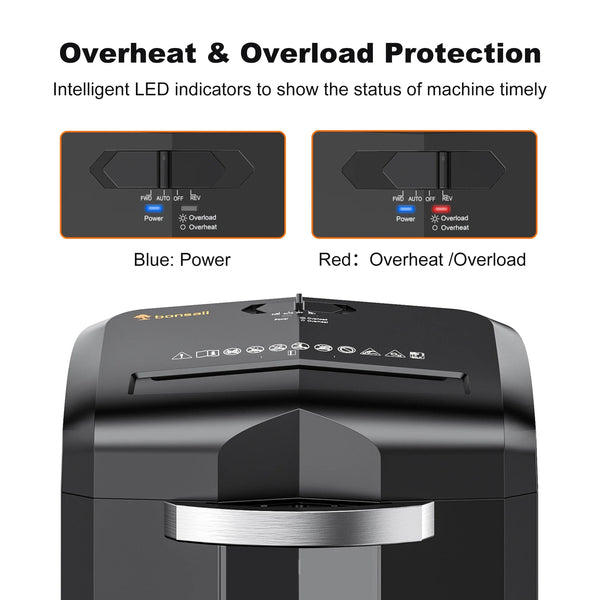
Lights tell you what is wrong. Learn their meaning.
Flashing Power Light
This means the waste bin is full. Even a small amount of paper can trigger it. Empty the bin, wipe the sensor, and reinsert firmly. If the light persists, clean the bin housing.
Overload Warning Light
This flashes when the motor is strained. Likely causes include too many sheets, thick paper or staples, or a paper jam. Clear debris, reduce load, and let cool.
Overheating Light
A steady or flashing red light means the motor is too hot. Stop use. Unplug. Wait 30 to 60 minutes. Restart only after full cooldown.
Normal Lights, No Action
If lights are on but nothing happens, check for hidden jams, dirty sensors, or a failed motor. Try reverse mode. If silent, the motor may be dead.
Handle Burning Smells and Noises
Not all smells mean disaster, but some do.
Identify Burning Smell Type
If the smell fades quickly with no smoke, it is likely initial break-in or minor overheating. It is safe to continue after cooldown.
If it persists with smoke and lights off, stop immediately. Unplug. This indicates motor or circuit board failure. Do not reuse.
Diagnose Noise Issues
Grinding or loud noise means dry blades. Lubricate.
Irregular movement means a jammed gear or foreign object. Clear and clean.
Silence when powered means a dead motor or power board.
Know When to Seek Professional Help
Some failures require support, not DIY.
Motor or Circuit Failure
If resets, cleaning, and lubrication fail, the issue is likely internal. No sound on startup means a dead motor. No response to power means a failed circuit board. These need professional repair.
Warranty and Support Info
Bonsaii offers a 1-year free warranty. Contact general support at support@bonsaii.com or customer care at customer-care@bonsaii.com.
Do not disassemble because it voids the warranty. Internal repairs are not user-serviceable.
When Replacement Is Better
Consider replacement if your shredder is over 2 years old, repeatedly jamming despite care, or emitting smoke or burning smells. Repair costs may exceed value.
Frequently Asked Questions About Bonsaii Shredder Repair
Why does my Bonsaii shredder not turn on at all?
Start by testing the outlet with another device. Check the circuit breaker and verify the power switch is on. If those are fine, try a full power cycle by unplugging and waiting 30 to 40 minutes. Over 90% of power issues resolve with these steps.
How do I fix a paper jam in my Bonsaii shredder?
Unplug first. Use the reverse function in short bursts. If that fails, use tweezers to pull visible paper, then vacuum the area. Clean the feed sensor with a dry cloth. For stubborn jams, try the sensor trick method using cardboard from the side.
Can I use WD-40 on my Bonsaii shredder?
Yes, but only on specific models like the C169-B. Use short bursts into the feed slot. For deeper cleaning, apply WD-40 to a 3mm-thick card and run it through 2 to 3 times. This prevents jams for about one month. Use lightly to avoid attracting dust.
What do the indicator lights mean on my Bonsaii shredder?
A flashing power light means the bin is full. An overload light means too many sheets or a jam. An overheating light means the motor needs 30 to 60 minutes to cool. Normal lights with no action indicate a hidden jam, dirty sensor, or motor failure.
How often should I lubricate my Bonsaii shredder?
Lubricate every 10 to 15 uses or when you notice slower performance, louder noise, frequent jams, or burning smells. Regular oiling extends motor life and prevents overheating.
When should I replace my Bonsaii shredder instead of repairing it?
Replace if the shredder is over 2 years old, repeatedly jams despite proper maintenance, or emits smoke or burning smells. If professional repair costs approach the price of a new unit, replacement is the better option.
Key Takeaways for Repairing Your Bonsaii Shredder
Most Bonsaii shredder issues are fixable with power resets, jam clearing, and regular maintenance. Over 90% of broken units respond to simple steps like full power discharge or sensor cleaning. Always unplug before performing any maintenance.
Lubricate every few months, avoid overloading with too many sheets, and never force paper through. For models like the C169-B and C275-A, use the WD-40 card trick and side-feeding method to prevent jams. Clean sensors regularly to avoid false error signals.
When in doubt, unplug, wait, and clean. If problems persist after trying all troubleshooting steps, contact Bonsaii support rather than risk voiding your warranty by disassembling the unit. With proper care, your shredder can last for years.