

Is your Fellowes MS 460Cs shredder not turning on, jamming frequently, or showing warning lights? You’re not alone. This model, part of the Powershred series, is built for reliable performance, but like all cross-cut shredders, it depends on proper use and routine care. Most issues with the Fellowes MS 460Cs stem from simple causes: paper jams, lack of oiling, full bins, or sensor blockages. The good news? Nearly every problem can be resolved in minutes with basic troubleshooting.
In this guide, you’ll learn how to quickly diagnose and fix the most common issues affecting the Fellowes MS 460Cs shredder, from red light alerts to motor failures. We’ll walk through step-by-step solutions based on Fellowes’ official maintenance protocols, so you can get your shredder back up and running without calling a technician.
Fix Common Power Issues
Shredder Won’t Turn On
If your Fellowes MS 460Cs doesn’t respond when you press the power button, don’t assume the motor is dead. Most “no power” cases are caused by safety interlocks or simple connection problems.
Check these first:
– Ensure the power cord is fully plugged into both the outlet and shredder
– Test the outlet with another device, such as a lamp or phone charger
– Confirm the bin is properly seated, since misalignment triggers a safety lock
– Make sure the bin door is completely closed
⚠️ Important: The MS 460Cs uses a safety interlock system. If the bin isn’t locked in place, the shredder will not power on, even if everything else seems correct.
If all connections are secure and the unit still won’t turn on, try pressing the “Auto” or “Forward” button instead. Some models activate only via sensor or manual feed. You can also unplug the shredder for 60 seconds, then plug it back in to reset the circuit.
Still no response? Move to resetting the internal overload protector:
1. Unplug the shredder
2. Wait 30 minutes to allow full cool-down
3. Plug back in and attempt to restart
If the problem persists, contact Fellowes support, as there may be an internal fuse or motor issue.
Clear Paper Jams Fast
Jammed Shredder Recovery Steps
A paper jam is the most frequent issue with the Fellowes MS 460Cs, especially after overfeeding or inserting folded or stapled documents.
Signs of a jam:
– Motor whirs but no shredding occurs
– Red light flashes or stays solid
– Paper won’t feed or reverses immediately
How to Clear a Jam
- Turn off and unplug the shredder
- Wait for the motor to cool if overheated
- Press and hold the Reverse button to back out stuck paper
- Gently pull visible paper forward; never force it
- Use tweezers for small fragments deep in the feed slot
- Once cleared, press Forward briefly to confirm smooth operation
🔧 Pro Tip: Alternate between Reverse and Forward in 2-second bursts to break up stubborn clumps without straining the motor.
Prevent Future Jams
- Never exceed 10 sheets per pass, which is the rated capacity for MS 460Cs
- Feed paper straight with no angles or curls
- Remove staples, paper clips, and thick bindings
- Shred one stack at a time and avoid mixing cardstock with regular paper
Decode Red Light Alerts
What the Red Light Means
The red indicator on your Fellowes MS 460Cs signals one of four conditions. It’s not always a fault; often, it’s a maintenance reminder.
Common red light causes:
– Bin is full
– Sensor is blocked
– Low oil level (if applicable)
– Safety interlock triggered when the bin is not seated
Red Light Blinking but No Jam?
Follow this checklist:
– Empty the bin and wipe sensors with a dry cloth
– Reinstall the bin firmly until it clicks
– Check for loose paper bridging the sensor gap
– Apply shredder oil if the unit feels sluggish
❗ Note: Unlike Auto-Oil models such as the 425Ci, the MS 460Cs does NOT have automatic oiling. You must oil manually every 15–20 minutes of use.
If the red light remains after these steps, perform a full reset:
1. Unplug the shredder
2. Wait 5 minutes
3. Plug back in and test
Persistent red light? Contact Fellowes support with your model and serial number.
Prevent and Fix Overheating
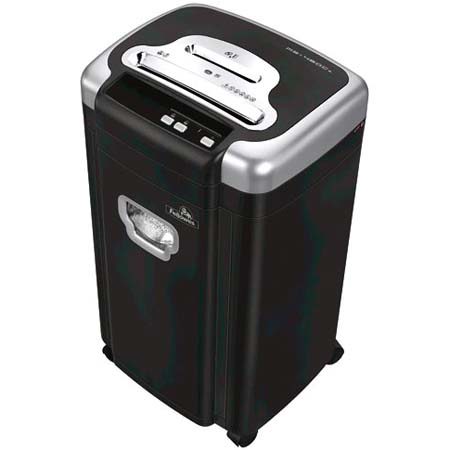
Shredder Keeps Overheating
The MS 460Cs has a built-in thermal overload protection system. If the motor gets too hot, the red light stays on and the shredder shuts down.
Typical cause: Exceeding continuous run time or repeated overfeeding.
This model is rated for 10 minutes of continuous shredding, followed by a 40-minute cool-down period.
What to Do When Overheated
- Turn off and unplug immediately
- Wait at least 40 minutes before restarting
- Do not press buttons during cool-down, since this doesn’t reset the timer
- After rest, plug in and test with a single sheet
⏱️ Tip: Use a kitchen timer or phone alert to track run and rest periods during heavy shredding sessions.
Extend Motor Life
- Shred in short bursts of 3–5 minutes
- Oil cutters before long sessions
- Keep the feed area clean and free of dust buildup
Overheating lessens significantly with consistent oiling and proper usage.
Keep Cutters Lubricated Manually
How to Oil the MS 460Cs
Since the MS 460Cs lacks Auto-Oil, manual lubrication is essential for smooth performance and long-term reliability.
Frequency: Every 15–20 minutes of continuous use, or after every 3–4 full bins shredded.
Only use: Fellowes Powershred Shredder Oil. Do not use aerosol products, WD-40, or vegetable oil.
Step-by-Step Oiling
- Power off and unplug the shredder
- Lay 2–3 long strips of paper together (8–10 inches wide)
- Apply a thin zigzag line of oil across the top edge
- Insert the oiled strip and press Forward
- Let the oil distribute through the cutters
- Shred 1–2 dry sheets to clean excess oil
🛢️ Warning: Never apply oil directly into the feed slot. Always use a paper lubricant sheet to avoid over-oiling and fire risk.
Regular oiling prevents:
– Paper tearing instead of clean cutting
– Motor strain and overheating
– Premature cutter wear
Clean Sensors and Avoid False Triggers
Sensor Errors Cause False Alarms
Dust, paper fibers, and static buildup around the feed slot can block infrared sensors, causing:
– False “bin full” alerts
– Failure to start when paper is inserted
– Intermittent operation
Clean the Sensor Area
- Unplug the shredder
- Open the feed throat cover if accessible
- Use a soft brush or canned air to remove debris
- Wipe the sensor window with a dry microfiber cloth
- Avoid liquids or sprays near electronics
🧹 Maintenance Schedule: Clean sensors every 2–4 weeks with regular use, or weekly in high-dust environments.
Pair cleaning with a test feed:
– Insert a single sheet
– Watch for smooth auto-start in Auto mode
Delayed or failed start? Repeat cleaning and check bin alignment.
Use Correct Waste Bags
Bin Full Alerts? Check the Bag
Even with space left, a poorly fitted or oversized bag can trigger a false “bin full” alert by shifting and blocking the sensor.
Recommended bag:
– Fellowes Waste Bags for 99Ci and AutoMax Series (fits MS 460Cs)
These bags are designed to:
– Fit snugly without sagging
– Prevent paper from bridging the sensor gap
– Reduce dust spillage during removal
Replace Bag Properly
- Remove full bag carefully to avoid tearing
- Wipe interior of bin with dry cloth
- Insert new bag and stretch corners over retention hooks
- Ensure the opening lies flat across the sensor zone
✅ Pro Tip: Tie off used bags tightly to minimize dust exposure when replacing.
Using the wrong size bag increases false alerts and cleaning time.
Handle Unusual Noises
Grinding or Squealing Sounds?
A healthy Fellowes MS 460Cs runs with a consistent, low hum. Any change in sound is an early warning sign.
Common noise causes:
– Debris caught in cutters
– Lack of lubrication
– Worn blades (rare, usually after years of neglect)
Diagnose and Fix
- Power off and unplug
- Inspect feed slot for visible obstructions
- Use tweezers or needle-nose pliers to remove stuck fragments
- Perform a full manual oiling cycle
- Run in reverse for 10 seconds, then forward
If noise continues:
– Stop using the shredder
– Contact Fellowes customer service for repair options
🔊 Listen closely: A rhythmic clicking may indicate a loose gear. Do not continue operation.
Early intervention prevents costly motor or gear damage.
Optimize Daily Operation
Best Practices for Longevity
The Fellowes MS 460Cs is built to last, but only if used within its design limits.
Follow these habits daily:
– Never exceed 10 sheets at once
– Feed paper straight and flat
– Oil every 15–20 minutes of use
– Empty bin before it reaches the top
– Allow 40-minute cool-down after 10 minutes of use
– Use only Fellowes-approved oil and bags
Avoid shredding:
– Credit cards (the MS 460Cs is not rated for them)
– CDs and DVDs
– Plastic folders or binders
– Wet or damp paper
📅 Monthly Maintenance Checklist:
– Clean sensors
– Wipe exterior and feed slot
– Inspect power cord for damage
– Test reverse and forward functions
– Verify oil supply is stocked
Frequently Asked Questions About the Fellowes MS 460Cs
Why is my Fellowes MS 460Cs shredder not turning on?
Most no-power cases trace to a safety interlock or loose connection. Ensure the bin is fully seated, the door is closed, and the power cord is plugged in firmly at both ends. If the issue continues, unplug for 60 seconds to reset the circuit.
How do I clear a paper jam in the MS 460Cs?
Turn off and unplug the shredder, then hold the Reverse button to back out stuck paper. Alternate Reverse and Forward in short bursts to break up stubborn clumps, and use tweezers for small fragments. Never force paper out by pulling.
What does a blinking red light mean on the MS 460Cs?
A blinking red light usually indicates a full bin, blocked sensor, or unseated bin. Empty the bin, wipe the sensors with a dry cloth, and reseat the bin until it clicks. The MS 460Cs does not have Auto-Oil, so the light is not a low-oil indicator.
How often should I oil my Fellowes MS 460Cs?
Oil the cutters every 15–20 minutes of continuous use, or after every 3–4 full bins shredded. Only use Fellowes Powershred Shredder Oil applied through a paper strip in a zigzag pattern. Never use aerosol lubricants or vegetable oil.
How long should I let my MS 460Cs cool down?
The MS 460Cs is rated for 10 minutes of continuous shredding followed by a 40-minute cool-down period. Pressing buttons during cool-down does not reset the thermal timer, so wait the full period before restarting.
Can I shred credit cards in the MS 460Cs?
No. The MS 460Cs is not rated for credit cards, CDs, DVDs, or plastic folders. Shredding these materials can damage the cutters and void the warranty.
Key Takeaways for Fellowes MS 460Cs Troubleshooting
The Fellowes MS 460Cs troubleshooting process is straightforward when you know what to look for. Most issues, including no power, red lights, jams, and overheating, trace back to overfeeding, lack of oiling, or sensor blockage. By staying within the machine’s limits and performing simple upkeep, you can avoid nearly all service calls and extend your shredder’s life for over a decade.
Reliable shredding isn’t about the machine alone; it’s about consistent habits and the right supplies. Use Fellowes oil, proper waste bags, and respect the duty cycle, and your MS 460Cs will deliver clean, quiet, and trouble-free performance for years to come.
For model-specific parts or warranty support, visit the official Fellowes Support Page.





