

Is your GBC binding machine acting up? From uncontrolled punching to misaligned holes, these problems can halt productivity in offices, print shops, and schools. The GBC MP2000PB, for example, has been reported to start punching continuously without user input, a serious issue even in brand-new units. Most problems, including this one, can be diagnosed and often resolved quickly with the right approach.
This guide delivers actionable troubleshooting strategies for GBC binding machines based on official GBC service protocols and real-world reports. You will learn how to diagnose electronic failures, reset malfunctioning units, clean critical sensors, and know when to call professional help, especially if your machine is under warranty.
Immediate Safety Protocol
Before attempting any fix, prioritize safety. GBC binding machines use high-force mechanical systems and electronic controls that can pose risks if mishandled.
Power Down and Unplug
- Always turn off and unplug the machine before inspection or cleaning
- Never bypass safety interlocks or guards
- Wait at least 30 seconds after unplugging to let internal circuits discharge
When to Stop and Call Help
- If the machine continues operating after being unplugged
- If you notice burning smells, smoke, or visible electrical damage
- If you are unsure about disassembling any part
Warning: Never attempt internal repairs unless trained. For newer models like the MP2000PB, warranty service may become void if tampered with improperly.
Diagnose Continuous Punching Issue
One of the most alarming issues reported is uncontrolled punching without user input, especially in recently purchased machines like the GBC MP2000PB. This is not normal and requires immediate action.
Why It Happens
Continuous punching typically stems from one of five root causes:
| Cause | How It Triggers the Problem |
|---|---|
| Faulty Control Board | Sends constant punch signal due to internal short or failure |
| Sensor Obstruction | Debris blocks sensor, making it think paper is always present |
| Sensor Failure | Malfunctioning sensor misreads input and activates autonomously |
| Electronic Glitch | Temporary software or memory fault causes looping command |
| Physical Jam | Paper fragment or foreign object keeps mechanism engaged |
Reset the Machine Immediately
Follow this reset procedure to clear temporary electronic faults:
- Unplug the machine
- Wait 30 seconds to allow memory to clear
- Plug the machine back in
- Power on
- If a reset button exists, press and hold it for 5–10 seconds
Pro Tip: Some GBC models do not have a visible reset button. In such cases, the 30-second power cycle acts as the reset.
Clean and Inspect Sensors

Sensors are the most common culprit in unintended machine activation. Dust, paper fragments, or misalignment can trick the system into thinking paper is loaded and needs punching.
Locate the Sensors
- On the MP2000PB, sensors are near the paper feed tray and punch head
- Look for small infrared or optical units, often black with a lens or emitter
Clean Safely
- Use a soft, dry cloth (microfiber preferred)
- Gently wipe sensor surfaces
- Use compressed air to blow out debris from surrounding areas
- Do not use liquids or abrasive materials
Visual Cue: If the sensor window looks cloudy or has visible dust, cleaning is essential.
Verify Sensor Alignment
- Ensure sensors are not bent or shifted
- Realign by gently adjusting the housing without forcing it
- Test by manually feeding a sheet and listen for correct punch response
Perform Visual Inspection
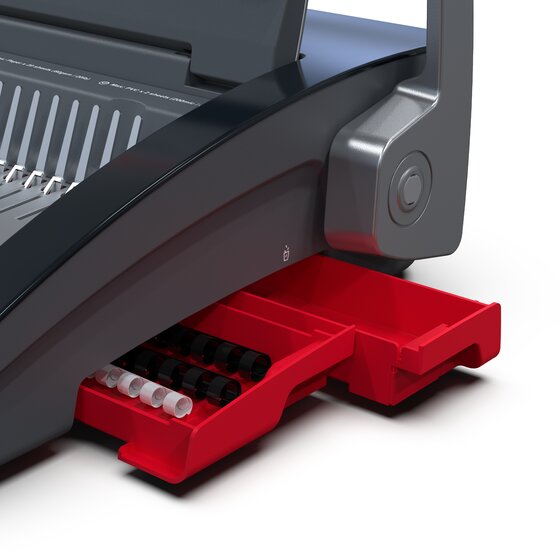
Even new machines can have internal debris from shipping or manufacturing. A careful visual check can reveal simple problems before deeper troubleshooting.
Open Access Panels
- Unplug the machine first
- Remove any removable covers per the user manual
- Inspect the punch mechanism, paper path, and waste bin
Remove Obstructions
- Look for paper scraps, staples, or foreign objects
- Use tweezers or gloves to extract debris; never use fingers near moving parts
- Empty the punch waste bin if full, since overflow can trigger errors
Common Mistake: Ignoring the waste bin. A full bin can interfere with sensor readings or mechanical movement.
Consult the User Manual
The official GBC user manual contains model-specific diagnostics, error codes, and reset procedures not found elsewhere.
What to Look For
- Error code list (if the display shows codes)
- Hard reset instructions
- Sensor location diagrams
- Warranty and service contact information
Expert Note: Keep your manual digitally backed up. GBC’s online Help Center allows account users to access purchase history and support documents.
Contact GBC Support (Warranty Applies)
If your machine is only 3 weeks old, like the reported MP2000PB case, warranty service is almost certainly available. After completing basic troubleshooting, professional help is the next step.
When to Call
- After completing all basic troubleshooting steps
- If the machine continues to malfunction
- If you suspect internal electronic failure
What to Have Ready
- Model number: GBC MP2000PB (or your specific model)
- Purchase date
- Description of the issue
- Steps already taken
How to Reach GBC
- Visit the GBC Online Help Center (account login required)
- Call GBC customer support directly
- Request service through a Full Circle Service® provider
Key Benefit: Under warranty, GBC covers parts, labor, and technician travel with no out-of-pocket costs.
Leverage Full Circle Service®
GBC’s Full Circle Service® program offers comprehensive support beyond basic warranty coverage.
What is Included
- Unlimited parts and labor
- Priority phone response
- Faster service scheduling
- Coverage for non-GBC equipment too
Ideal For
- Offices with multiple finishing machines
- Print shops needing minimal downtime
- Schools managing aging equipment fleets
Pro Tip: Even if your machine is out of warranty, a maintenance agreement can extend its life and prevent costly breakdowns.
Replace Faulty Components
If diagnostics confirm a hardware failure, genuine GBC replacement parts are essential for safe and reliable operation.
Common Parts to Replace
| Part | Symptom of Failure |
|---|---|
| Control Board | Continuous operation, no response to buttons |
| Punch Sensor | Missed punches or false triggers |
| Power Supply Unit | Machine will not turn on or resets randomly |
Order Genuine Parts
- Use GBC’s official parts portal
- Match part numbers exactly
- Avoid aftermarket components, which may void service agreements
Warning: Installing non-OEM parts can lead to compatibility issues and safety risks.
Prevent Future Issues
Prevention is faster and cheaper than repair. Build a maintenance routine to avoid repeat problems.
Weekly Sensor Cleaning
- Clean sensors with a dry microfiber cloth
- Blow out dust with compressed air
- Check for paper buildup in the feed path
Monthly Full Inspection
- Unplug and inspect the entire machine
- Empty the waste bin
- Verify all screws and panels are secure
Environmental Best Practices
- Keep the machine in a low-dust environment
- Avoid high humidity or temperature swings
- Place on a stable, level surface
Troubleshoot Other Common Binding Problems
Beyond continuous punching, GBC binding machines face other frequent issues that you can often fix yourself.
Misaligned Holes
Symptoms: Paper does not fit into comb or coil
Fix:
– Adjust the paper guide to match document size
– Use the alignment gauge if available
– Test with a single sheet first
Incomplete Punching
Symptoms: Some holes do not form
Fix:
– Check for dull or damaged pins
– Reduce sheet count per punch (do not exceed rated capacity)
– Ensure paper is fed straight
Jammed Mechanism
Symptoms: Machine stops mid-cycle
Fix:
– Power off and unplug
– Carefully remove stuck paper
– Reset the machine after clearing the jam
Know When to Upgrade
Some machines, even under warranty, may have recurring issues due to design limitations or heavy use.
Upgrade Indicators
- Frequent sensor or control board failures
- Outdated model with limited part availability
- Inability to handle current workload
Explore New Models
GBC offers updated punching and binding machines with:
– Improved sensor technology
– Enhanced durability
– Better user interfaces
Bonus: New purchases extend eligibility for Full Circle Service® and future support.
Frequently Asked Questions About GBC Binding Machine Troubleshooting
Why is my GBC binding machine punching on its own?
Continuous punching usually results from a faulty control board, obstructed or failing sensor, electronic glitch, or physical jam. Start by unplugging the machine, waiting 30 seconds, and cleaning the sensors with a dry cloth. If the issue continues, contact GBC support for warranty service.
How do I reset my GBC binding machine?
Turn off the machine, unplug it, and wait 30 seconds. Plug it back in and power it on. If your model has a reset button, press and hold it for 5 to 10 seconds to perform a factory reset.
Can I fix a GBC MP2000PB that is only 3 weeks old?
Yes. A machine that is 3 weeks old is almost certainly under warranty. After basic troubleshooting (reset and sensor cleaning), contact GBC customer support and provide your model number and purchase date. Warranty service typically covers parts, labor, and travel costs.
Where are the sensors located on a GBC binding machine?
On the MP2000PB, sensors are located near the paper feed tray and punch head. They appear as small infrared or optical units, often black with a visible lens or emitter.
What does Full Circle Service® cover?
Full Circle Service® includes unlimited parts and labor, priority phone response, and faster service scheduling. It applies to GBC equipment and can also extend to non-GBC finishing equipment like laminators, collators, and shredders.
How often should I clean my GBC binding machine?
Clean the sensors weekly with a dry microfiber cloth and compressed air. Perform a full inspection monthly, including emptying the waste bin and checking all panels and screws.
Key Takeaways for GBC Binding Machine Troubleshooting
GBC binding machines are built for reliability, but even the newest models like the MP2000PB can develop issues such as continuous punching due to sensor problems, electronic glitches, or control board failures. The key is to act quickly, safely, and systematically.
Start with power cycling and sensor cleaning, then consult the manual and contact GBC support if needed, especially with a 3-week-old machine under warranty. Use genuine parts and consider a maintenance agreement to prevent future downtime. By following this guide, you will restore your machine faster, extend its lifespan, and keep your workflow uninterrupted.
Next Step: Log in to your GBC account today to access your manual, order parts, or schedule service through the Help Center.





