If you’ve ever struggled to keep reports neat, presentations professional, or custom books looking polished, an Ibico binding machine might be the solution you’re looking for. These reliable devices are popular in offices, schools, and print shops because they create documents that lie flat when opened, giving your work a finished, professional appearance. The most common models, including the Ibico Kombo and Ibico Ibimatic, support both plastic comb and spiral binding for versatile document finishing.
Learning how to use an Ibico binding machine correctly saves you from misaligned holes, jammed mechanisms, and loose bindings that fall apart. This guide covers every phase of the process, from selecting the right comb size to securing the final bind and troubleshooting common issues. You’ll learn how to adjust margin depth, punch in proper batches, and fix mechanical problems like a stuck handle.
Choose the Right Binding Size for Your Document
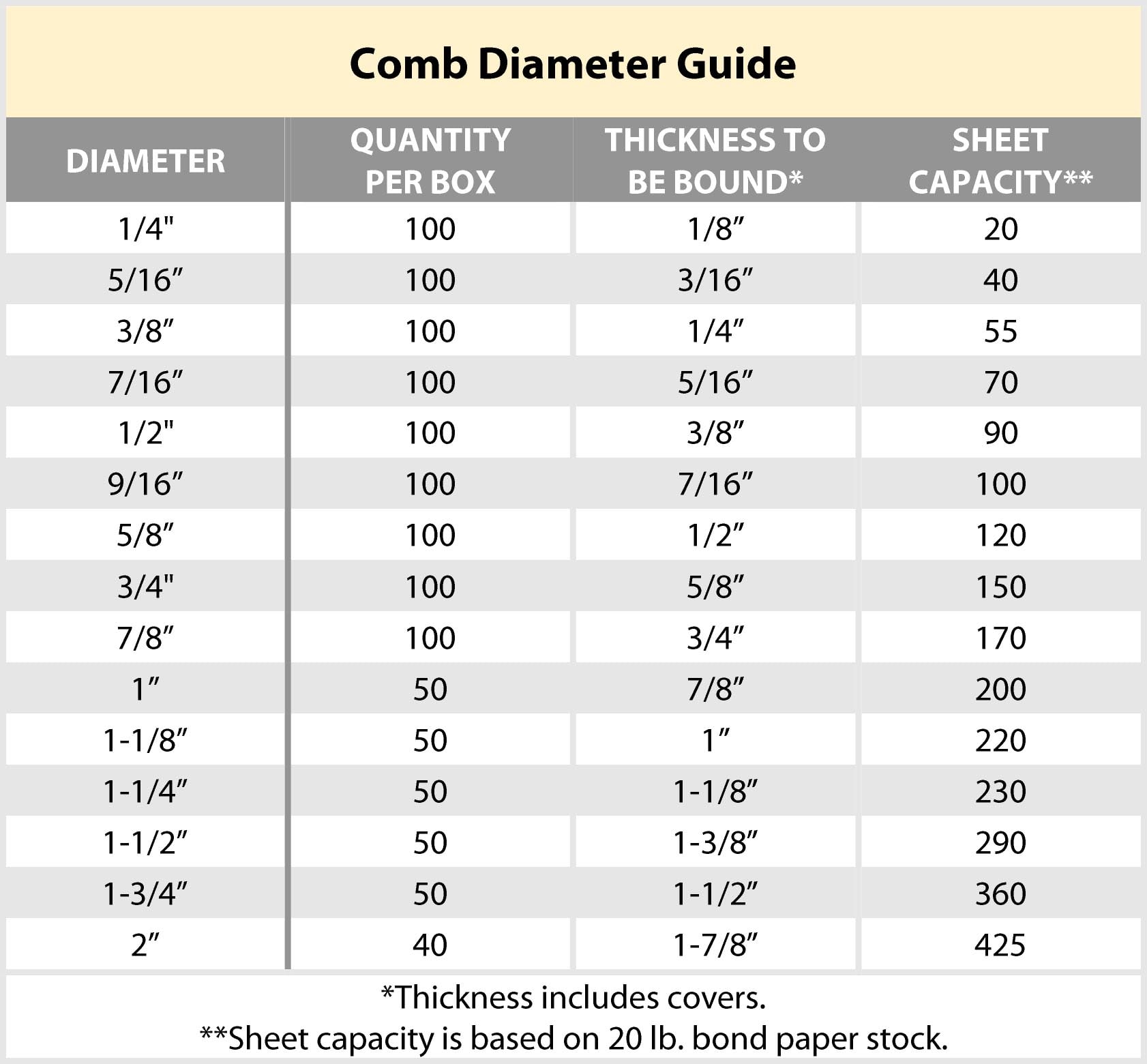
Match Comb Size to Page Count
Selecting the correct binding size is the foundation of a secure, professional bind. Ibico machines support binding diameters from 5mm to 30mm. Use this quick reference to match your page count:
| Binding Size | Page Capacity |
|---|---|
| 5mm–10mm | Up to 50 pages |
| 15mm | Up to 100 pages |
| 20mm–30mm | Over 100 pages |
Always measure your paper stack before choosing a comb. The Ibico Kombo can bind books up to 2 inches thick, which requires a 30mm comb. A comb that is too small won’t fit your pages, while a comb that is too large will leave the binding loose and wobbly.
Avoid Common Sizing Mistakes
Many users select oversized combs for convenience, but this leads to pages that shift and flop. Always use the smallest comb that comfortably fits your document. For mixed paper weights like cardstock covers, compress the stack gently before measuring to get an accurate size.
Prepare Your Document Before Inserting
Align Pages Before Loading
Misaligned pages create uneven holes and weak binding. Before loading your document, confirm all pages are the same size (Letter or A4), arranged in the correct order, and free of staples, clips, or sticky notes that can damage the punch mechanism.
Stack your pages and tap them firmly on a flat surface to align all edges. The spine edge (usually the left side) must face the punch mechanism throughout the process.
Use the Correct Page Orientation
Insert the stack with the spine edge flush against the feed tray guide. Reversing the direction results in holes on the wrong side, which ruins the entire document. Double-check that the top of every page faces the same way. A single flipped sheet can throw off the alignment of the whole batch.
Set Up the Ibico Kombo Machine
Adjust Margin Depth with the Dial
The Ibico Kombo features a dial-adjustable margin depth for precise hole placement. Turn the dial to match your selected comb size: smaller combs (5–10mm) need a narrower margin, while larger combs (20–30mm) require a wider margin.
Test your settings on a scrap stack before punching your final document. Misadjusted margins put strain on the binding or cause torn paper.
Select Punch Keys for Custom Patterns
The Kombo offers selectable punch keys that let you customize hole patterns. This feature is useful for skipping middle holes when binding double-sided prints. Press the key to deactivate unwanted punch pins. Always verify your pattern alignment before punching final documents.
Punch Holes in Proper Batches
Feed Pages into the Tray
Open the feed tray and insert your aligned stack. Do not exceed 10 sheets at a time, as this is the manual punch limit for the Kombo model. Overloading strains the mechanism and results in incomplete or ragged punches.
Ensure the spine edge is flush with the guide and close the tray fully. Partial tray closure leads to misaligned holes that cannot be fixed without re-punching.
Activate the Punch Mechanism
Press the punch lever firmly. On manual models, you’ll feel resistance as the holes are created. Lift the lever to reset and repeat for each batch until all pages are punched.
Visual cue: Clean, round holes with no ragged edges indicate sharp pins. If holes appear torn or incomplete, clean the punch area or reduce your sheet count.
Insert the Binding Comb
Open the Plastic Comb
On the Ibico Ibimatic, use the right-hand handle to open the comb. Insert the comb into the opening mechanism, then pull the handle down to spread the teeth. Keep the handle engaged while inserting pages.
If the handle won’t retract (a known Ibimatic issue), refer to the troubleshooting section below for the fix.
Slide Pages Onto the Comb
With the comb teeth open, hold the comb vertically and slide the punched edge down over the teeth. Make sure all holes engage evenly across every page. Release the handle slowly to close the comb. You should hear a soft click as the teeth snap shut.
Secure Spiral or Comb Binding
Close Plastic Combs Fully
After inserting pages, verify the comb is fully closed. Gaps at the ends mean the binding is insecure. Use the machine’s comb closer tool if available, or press the ends manually on a flat surface.
Pro tip: Rotate the comb 90 degrees and press the ends down with your palm for even pressure across all teeth.
Finish Spiral Binding
For spiral binding, thread the spiral wire through the holes from the bottom up. Use the machine’s built-in crimper to bend the ends, then trim any excess wire. Ensure the spiral is tight and does not twist. Loose spirals cause pages to snag and tear over time.
Troubleshoot Common Ibico Binding Machine Problems

Fix Misaligned Holes
Symptoms: Pages don’t sit evenly or the comb bends awkwardly.
Causes and Fixes:
– Pages not aligned: re-stack and tap edges before re-punching
– Feed tray not closed: ensure tray is fully seated
– Margin depth incorrect: adjust the dial and re-punch
Always re-punch the entire batch if alignment is off. Partial fixes won’t produce a clean result.
Handle Won’t Retract on the Ibimatic
Problem: The handle punches but won’t return to open the comb.
Diagnosis:
– Handle moves freely during punching
– Stops abruptly at the top position
– Spring mechanism appears intact
Root Cause: Disconnected internal metal bar.
Fix:
1. Unplug the machine
2. Disassemble the handle mechanism
3. Reinsert the metal bar into its guide slot
4. Reassemble and test
This repair often requires no replacement parts, just proper reseating of the bar.
Binding Won’t Stay Closed
Causes:
– Incorrect comb size
– Ends not fully snapped
– Low-quality comb material
Solutions:
– Use OEM Ibico combs for best fit
– Press ends on a hard surface
– Avoid overfilling the comb
Clean and Maintain Your Machine
Remove Paper Dust Regularly
Paper particles build up in the punch area and reduce performance over time. After every few uses, unplug the machine and use a small brush or compressed air to clean around the punch pins and feed tray. Avoid liquids, as they can damage internal mechanisms.
Inspect for Wear and Damage
Check these parts monthly:
– Punch pins: look for dullness or bending
– Comb opener: test for smooth operation
– Margin dial: ensure it turns freely
On the Ibico Kombo, verify that selectable punch keys click properly. Sticky keys cause skipped holes and uneven binding.
Optimize Your Machine for Long-Term Use
Handle with Care
Never force the punch lever. If resistance feels excessive, check for paper jams or misfeeds. Rough use leads to internal damage, like the disconnected metal bar seen in Ibimatic models.
Prevent Jamming
Follow these habits to avoid jams:
– Punch only clean, dry paper
– Avoid glossy or laminated sheets
– Don’t mix paper sizes in one batch
For heavy use, schedule weekly cleanings and monthly inspections to catch problems early.
Get Training for Best Results
Request Onsite Setup and Training
The Ibico Kombo (used model, SKU: KOMBO-Gray-U) offers onsite setup and operator training as a paid delivery option through Brett’s facility. This is highly recommended if you’re new to binding machines.
Training covers:
– Margin depth adjustment
– Punch key selection
– Comb opening and closing
– Basic troubleshooting
Even experienced users benefit from a hands-on refresher, especially when learning a new model.
Final Checklist for Perfect Binding
Verify Before Finalizing
After binding, inspect your document for even page alignment, a secure comb or spiral, and smooth opening with full lay-flat ability. Open the book completely. If pages resist or rise off the surface, the binding is too tight or too loose.
Store Binding Supplies Properly
Keep combs and spirals in a dry, cool place. Heat can warp plastic combs. Store them flat or on a rack. Never stack them under heavy objects that can deform the teeth.
Frequently Asked Questions About Using an Ibico Binding Machine
What is the maximum number of sheets an Ibico Kombo can punch at once?
The Ibico Kombo manually punches up to 10 sheets at a time. Exceeding this limit strains the mechanism and produces incomplete or ragged holes.
How do I fix an Ibico Ibimatic handle that won’t retract?
The most common cause is a disconnected internal metal bar. Unplug the machine, disassemble the handle mechanism, and reinsert the metal bar into its proper guide slot. The binder should then function normally without needing replacement parts.
What size comb should I use for a 100-page document?
Use a 15mm comb for documents up to 100 pages. For documents over 100 pages, use a comb between 20mm and 30mm, depending on the exact page count and paper weight.
Can I bind different paper sizes together in one document?
No. All pages should be the same size, typically A4 or Letter. Mixing paper sizes causes misaligned holes and an uneven bind. Stick to one size per document for clean results.
How often should I clean my Ibico binding machine?
Clean the punch area after every few uses to prevent paper dust buildup. Perform a more thorough inspection monthly, checking punch pins, the comb opener, and the margin dial for wear.
Does the used Ibico Kombo come with a warranty?
No, the used Ibico Kombo (SKU: KOMBO-Gray-U) does not come with a warranty. However, onsite setup and operator training are available as a paid delivery option through Brett’s facility.
Key Takeaways for Mastering Your Ibico Binding Machine
Using an Ibico binding machine effectively comes down to preparation, precision, and consistent maintenance. Start by selecting the correct comb size based on your page count, then align your pages carefully and punch in batches of 10 or fewer. Take time to adjust the margin depth and punch keys on the Kombo for clean, accurate holes. When troubleshooting, remember that most issues stem from misalignment, incorrect comb size, or simple internal components like the disconnected metal bar in the Ibimatic.
Your next step is to set up a regular cleaning schedule and keep your binding supplies stored properly. With these habits in place, your Ibico binder will deliver professional, durable results for years to come.