You’ve got stacks of old bills, expired IDs, or outdated contracts cluttering your desk. Simply tossing them in the trash risks identity theft. That’s where your paper shredder comes in. Knowing how to use a paper shredder properly isn’t just about pressing a button; it’s about protecting your privacy, avoiding jams, and extending your machine’s life. Whether you’re using a basic cross-cut model or a heavy-duty office shredder, following the right steps ensures smooth, safe operation. In this guide, you’ll learn how to set up, feed, maintain, and troubleshoot your shredder like a pro so you can destroy sensitive documents with confidence.
Safety First: Protect Yourself and the Machine
Before feeding any paper, prioritize safety. Shredders have fast-spinning blades that can cause serious injury or damage if misused. Taking a few moments to prepare yourself and the workspace prevents accidents that could land you in an emergency room or damage your machine permanently.
Secure Loose Items
Remove dangling jewelry, roll up long sleeves, and tie back long hair. These can get caught in the paper feed and pull body parts toward the blades. Always keep hands at least 6 inches from the inlet during operation. If you have long hair, secure it in a tight bun or ponytail before starting.
Keep Kids and Pets Away
Place the shredder in a secure area away from curious fingers and paws. Never leave the machine running unattended, even for a quick moment. Children and pets don’t understand the danger and may investigate while you’re distracted.
Power Off for Maintenance
Always unplug the shredder before clearing jams or inspecting the blades. Even when switched off, capacitors can retain electrical charge. Unplugging eliminates this risk completely and keeps you safe during any maintenance work.
Set Up Your Shredder Correctly

Proper setup prevents errors and ensures reliable performance from the very first use. A few minutes spent positioning the machine correctly saves hours of frustration later.
Place on a Stable Surface
Set the shredder on a flat, dry table or desk near a power outlet. Avoid wobbly surfaces that could shift during use and misalign the paper feed. A stable foundation keeps everything running smoothly.
Insert the Waste Bin Fully
Slide the bin into place until it clicks. Most models have sensors that disable operation if the bin isn’t seated correctly. A loose bin can trigger error lights or cause the motor to overheat from improper operation.
Check Power and Indicator Lights
Plug in the shredder and turn the switch to “On.” A green light should illuminate. If nothing happens, confirm the outlet works by testing with another device and ensure the power cord is fully inserted into both the machine and wall.
Know Your Control Panel
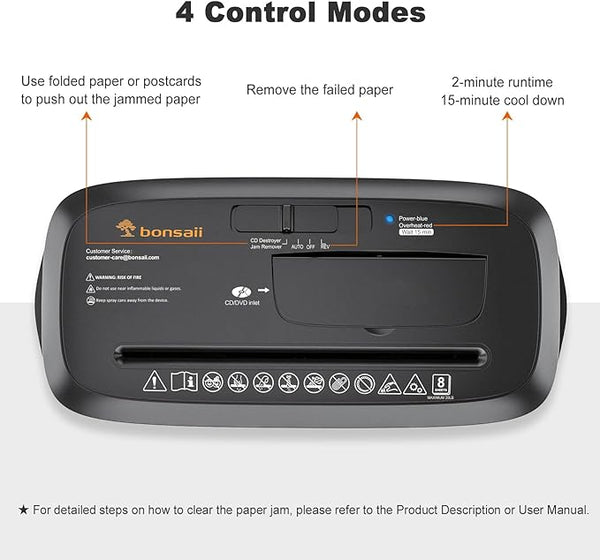
Understanding the buttons or switch positions helps you use the shredder efficiently and avoid costly mistakes. Most modern shredders use a multi-position switch that controls different functions.
Auto Mode for Normal Use
Set the switch to the center position for standard shredding. The machine activates only when paper breaks the sensor beam. It stops automatically after the last sheet passes through, which is ideal for small batches and saves energy.
Continuous Mode for Heavy Loads
Switch to the left position when shredding large volumes. The blades run nonstop, so you can feed paper rapidly without waiting for sensor activation. This mode is perfect for office environments with significant document destruction needs.
Reverse Mode Clears Jams
Use the right setting to back out stuck paper. Never force paper through the machine. The reverse motion safely dislodges jams without damaging blades or straining the motor. This feature is your best friend when dealing with paper backups.
Turn Off After Use
Return the switch to “Off” or unplug the unit when finished. This prevents accidental startups and saves energy. It’s a simple habit that extends the life of your machine and prevents unexpected operation.
Prepare Documents Before Feeding
Skipping preparation is the number one cause of jams and motor strain. Taking a few seconds to get documents ready protects your investment and keeps operations flowing smoothly.
Remove Fasteners
Take out paper clips, binder clips, and staples before shredding. While some heavy-duty models tolerate a few staples, most household shredders cannot handle them. Metal pieces dull blades quickly and cause stubborn jams that require tedious removal.
Avoid Wet or Damaged Paper
Never feed damp, wrinkled, or folded paper into the machine. Moisture weakens fibers, making them tear unpredictably and stick to blades. Let wet documents dry completely or dispose of them manually to avoid damaging your shredder.
Shred Plastics Only If Compatible
Credit cards, ID badges, and DVDs can only be shredded if your model supports plastic. Check your manual before attempting this. When shredding plastic, empty the paper bin first and dispose of plastic shreds separately in the trash, not with recycling.
Feed Paper the Right Way
How you insert paper determines whether your shredder runs smoothly or grinds to a halt. Following proper feeding technique extends the life of your machine significantly.
Respect the Sheet Limit
If your shredder is rated for 12 sheets, feed only 8 to 10 for best results. Heavier paper, glossy brochures, or folded documents should be fed 2 to 4 at a time. Overloading causes jams and overheating that could permanently damage the motor.
Center the Stack
Align the paper evenly and insert it into the middle of the feed slot. Off-center feeding pulls the stack sideways, dramatically increasing jam risk. A centered stack feeds smoothly through the blades every time.
Push Gently and Steadily
Let the machine pull the paper in. Don’t force it. If resistance is felt, stop immediately and reduce the number of sheets being fed. Forcing paper damages the mechanism and strains the motor.
Wait Between Feeds in Auto Mode
After each batch, pause for 2 to 3 seconds. This gives the sensor time to reset and the blades to clear fully before the next insertion. Rushing between feeds overwhelms the system and causes paper to bunch up inside.
Monitor and Manage the Waste Bin
An overfilled bin is a common cause of shutdowns and motor burnout. Regular monitoring prevents catastrophic failures that require professional repair.
Check Fill Level Frequently
Use the bin’s viewing window to monitor capacity. Stop feeding when shreds reach three-quarters full. Overfilling forces paper against the blades, causing dangerous friction and overheating that can melt plastic components.
Empty the Bin Properly
Turn off and unplug the shredder. Pull the bin out smoothly from both sides. Dump contents into a recycling container if the shreds are paper only. Reinsert the bin until it clicks securely into place before resuming operation.
Recycle Shredded Paper Correctly
Most curbside recycling programs accept shredded paper if it’s placed in a paper bag or cardboard box to prevent litter. Never mix shredded paper with plastic or stickers. Check your local rules, as some municipalities require special bundling procedures.
Avoid Overheating and Motor Strain
Shredders are not built for endless use. Smart operation prevents thermal shutdowns that leave you stranded without a working machine.
Limit Continuous Use to 15 Minutes
After 10 to 15 minutes of shredding, turn off the machine and let it rest for 30 to 45 minutes to cool down. High-end models may allow longer runs, but most home units need breaks to function properly over time.
Listen for Warning Signs
A slow, labored motor sound means the machine is straining. Stop immediately if you hear this. The cause could be too many sheets, dull or gunked-up blades, or simply overheating from extended use.
Spread Large Jobs Over Days
Need to shred post-tax documents or old files? Do 10 to 15 minutes per day instead of one marathon session. This protects the motor, prevents frustration, and keeps your shredder working reliably for years.
Troubleshoot Common Problems

Even with perfect care, issues occasionally arise. Quick fixes keep your shredder running without expensive repairs.
Paper Jam? Reverse It Out
If the machine stops and makes a grinding noise, switch to Reverse mode. Let blades spin backward for 5 to 10 seconds. Use tweezers or pliers with power off to gently pull out stuck paper. Insert a thick card like a business card to clear remaining debris. Never reach into the feed slot while the machine is powered.
No Power? Check These First
Verify the outlet works by testing with another device. Confirm the power cord is fully plugged in at both ends. If lights still don’t appear, the beam brake sensor may be dirty. Clean it by inserting a dry paper towel into the slot and moving it back and forth several times.
Indicator Lights Explained
A red light on the left indicates the bin is full. The middle yellow light means the bin isn’t properly inserted. A red light on the right signals overload from too many sheets. A flashing overheat light means the motor is too hot and needs a 45-minute break.
Maintain Blades for Longevity
Sharp, clean blades cut efficiently and reduce strain on the motor. Regular maintenance prevents premature wear and expensive replacements.
Lubricate Every Few Months
Use shredder oil sheets or liquid shredder oil to maintain cutting efficiency. Turn on the shredder in Auto or Reverse mode. Spray oil or feed an oil-lubricated sheet through the machine. Run for 10 to 15 seconds to coat blades evenly. Avoid vegetable or household oils that attract dust and gum up blades.
Clean the Sensor Regularly
Dust blocks the paper sensor and causes operational problems. Every few weeks, wipe the feed slot with a dry cloth or insert a folded tissue to clear debris. This simple step prevents many common operational failures.
Choose the Right Shredder for Your Needs
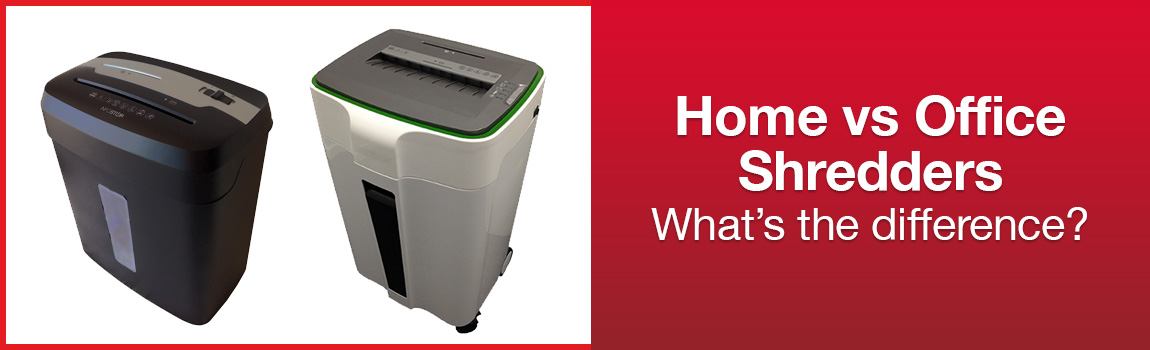
If you’re shopping or upgrading, match the machine to your actual workload. The right choice prevents burnout and ensures reliable service.
For Home Use: Cross-Cut Shredders
Look for 8 to 12 sheet capacity with cross-cut cutting for security. Auto-start and bin-full indicators are essential features. Expect to pay between $50 and $100 for a reliable model that handles occasional document destruction.
For Home Office: High-Capacity Models
Choose 15 or more sheet capacity if you shred regularly. Continuous run mode and overheat protection are must-have features. These models typically cost between $100 and $200 and handle heavier workloads without strain.
When to Use Shredding Services
If you regularly shred more than two grocery bags of documents, consider professional services. Local banks and community centers often host shred events. Professional mobile shredding services handle bulk securely and save significant wear on your personal machine.
Dispose of Shreds Responsibly
Final disposal completes the security loop and protects the environment. Proper handling ensures your efforts don’t create new problems.
Recycle Paper Shreds
Place shredded paper in a labeled paper bag or box before putting it in the recycling bin. Loose shreds scatter and contaminate other recyclables. Bundled shreds process cleanly through most municipal programs.
Trash Non-Recyclables
Shredded plastic cards, thermal receipts, and carbon-coated paper should go in the regular trash, not recycling. These materials contaminate paper recycling streams and create problems at processing facilities.
Clean Your Workspace
Wipe down the shredder surface and sweep stray shreds regularly. A tidy area reduces dust buildup, improves safety, and keeps your equipment running better for longer.
Key Takeaways for Using Your Paper Shredder
Using a paper shredder correctly means more than just destroying documents. It means doing it safely, efficiently, and sustainably. Respect capacity limits to prevent jams and motor damage. Maintain the machine with regular oiling and sensor cleaning. Understand your control panel modes for optimal performance. By following these steps every time you use your shredder, you’ll avoid common problems, extend the machine’s life, and protect your personal data for years. Whether you’re clearing old tax files or routine junk mail, these practices ensure you get the most out of your investment while keeping your information secure.
Frequently Asked Questions About Using Paper Shredders
How many sheets can I shred at once?
It depends on your model’s rating. For best results, stay 2 to 4 sheets below the maximum capacity. If your shredder is rated for 12 sheets, feed only 8 to 10 at a time to prevent jams and overheating.
Can I shred staples or paper clips?
Remove paper clips completely. Some heavy-duty models can handle up to 3 staples, but most standard shredders require staples to be removed manually to prevent blade damage and jams.
Why does my shredder keep jamming?
Jams usually occur from overloading, feeding off-center paper, or not removing fasteners. Reduce batch size, center your paper, and prepare documents properly before feeding them into the machine.
How do I fix a paper jam?
Switch to Reverse mode to spin blades backward and dislodge stuck paper. If that doesn’t work, turn off and unplug the shredder, then use tweezers to gently pull out stuck pieces. Never reach into the feed slot while the machine is powered.
How often should I oil my shredder?
Lubricate blades every few months with specialized shredder oil or sewing machine oil. More frequent use requires more regular oiling. Proper lubrication extends blade life and prevents motor strain.
Can I recycle shredded paper?
Yes, most municipalities accept shredded paper in curbside recycling. Place it in a paper bag or cardboard box first to prevent littering. Never mix shredded paper with plastics or other materials.