

Your Bonsen paper shredder stops mid-use. The motor hums but won’t pull in paper. Or worse, nothing happens when you press the button. You’re not alone. Bonsen paper shredder troubleshooting is a common need, especially with frequent office use or aging units. Whether it’s a power failure, paper jam, or strange noise, most issues stem from simple causes: overheating, blockages, or lack of maintenance. The good news? Over 90% of problems can be fixed at home, no tools or technician required. This guide walks you through step-by-step fixes for every major issue, using only what’s in your desk drawer. By the end, you’ll know how to reset, clean, and revive your shredder, plus prevent future breakdowns.
Power Won’t Turn On
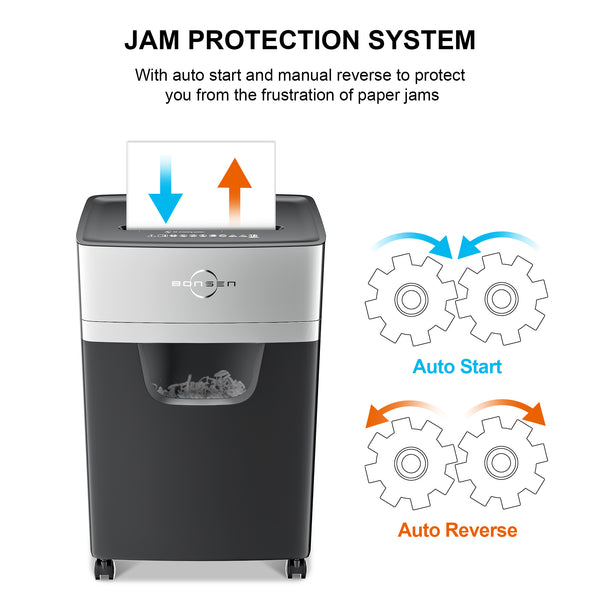
A dead shredder isn’t always a broken one. Most “no power” cases are caused by safety features or temporary shutdowns. Start here before assuming motor failure.
Check Outlet and Power Switch
First, confirm the basics. Plug a lamp or phone charger into the same outlet. If it doesn’t work, reset the circuit breaker or GFCI outlet. Many office outlets have a hidden reset button between the sockets. Press it firmly. Next, trace the power cord. Ensure it’s fully seated in both the wall and the back of the shredder. Some Bonsen models have a physical power switch on the rear. Make sure it’s in the ON position. A common mistake is leaving it off after cleaning.
Reset Thermal Protection
Overheating triggers automatic shutdown. If you’ve been shredding for more than 2 to 5 minutes continuously, the motor likely tripped its thermal fuse. Unplug the unit immediately. Wait 30 to 60 minutes. This isn’t just cooling time. It allows the internal thermal switch to reset. Do not skip this step. Simply turning the switch off won’t reset the protection. After waiting, plug it back in. Test with one sheet. If it runs, avoid long sessions and follow duty cycle limits.
Press the Hidden Reset Button
Electronic glitches freeze the control board. Many Bonsen shredders have a small, recessed reset button on the top or side of the control panel. Use a paperclip or toothpick to press and hold it for 10 seconds. Release, then try powering on. This fixes frozen units where lights don’t respond. If no reset button is visible, perform a full power cycle. Unplug for 30 to 40 minutes, then reconnect. This drains capacitors and resets the logic board.
Inspect Safety Interlock Switch
The shredder won’t start if the waste bin isn’t fully seated. Remove the bin and check the alignment tabs. Push it back in until it clicks. If the unit still won’t power, flip the shredder head over. Look for a small white plunger switch on the frame. This is the safety interlock. Press it down several times. If it’s stuck or doesn’t spring back, it may be jammed with debris or failing. Clean around it with a dry brush. A misaligned switch is a top cause of no power even with correct assembly.
Paper Jams and Feed Failures
Jams are the number one issue with Bonsen shredders. They stop feeding, chew paper unevenly, or stall under load. The fix often lies in lubrication, not brute force.
Reverse to Clear Minor Jams
Never shove fingers into the slot. Always unplug first. Set the mode switch to REV (Reverse). While holding the button, gently pull the paper upward. Don’t yank. This tears the sheet and leaves fragments. If the paper doesn’t budge, use the rocking method. Switch between REV, OFF, REV every 2 to 3 seconds. This mimics a pulsing motion that loosens grip. Repeat until the paper backs out.
Extract Stubborn Paper with Tools
For deep jams, use tweezers or needle-nose pliers to grab exposed paper ends. Work slowly to avoid pushing debris further. A straightened paperclip can hook small scraps near the blades. In severe cases, remove the front cover with a screwdriver. Consult your manual. Once open, clear all paper remnants. Reassemble tightly. Misaligned covers trigger safety switches.
Lubricate Blades to Prevent Jams
Dry blades cause 70% of recurring jams. Use shredder-specific oil or plain vegetable oil in a pinch. Drip 3 to 5 drops across the cutter teeth. Let it soak for 5 minutes. This softens built-up paper dust and eases gear movement. After soaking, plug in and run in reverse for 5 seconds, then auto-shred 2 to 3 scrap sheets. This distributes oil and clears residue. Lubricate every 15 to 30 minutes of use to keep performance smooth.
Sensor and Feed Problems

Your shredder runs but won’t start when paper is inserted. Or it runs nonstop. These point to sensor issues, not mechanical failure.
Clean the Feed Sensor
Dust blocks the optical sensor in the feed chute. Unplug the unit. Use a dry tissue or soft brush to wipe the center of the entry slot. Avoid liquids. They can damage electronics. Shine a flashlight to see if paper debris is stuck around the sensor eyes. Use a vacuum with a narrow nozzle to remove fine dust. Never blow with your mouth. Moisture corrodes contacts.
Test Sensor Response Manually
After cleaning, test with a single sheet. If it still doesn’t feed, try feeding cardboard, a paper towel, or a small stack of paper into the side edges of the slot. Some models use side sensors as triggers. If the motor starts, the center sensor was blocked. For continuous running, unplug for 10 minutes to reset the logic board. Reconnect and test. If the problem returns, the sensor may be faulty and need replacement.
Strange Noises and Burning Smells
Unusual sounds or odors signal stress. Address them fast to avoid permanent damage.
Diagnose Grinding and Loud Noises
A louder-than-normal shredder often just needs oil. Dry gears and blades create friction and noise. Apply lubricant as described. If noise persists after oiling, open the unit and check for debris in the gear train. Use tweezers to remove paper bits. If the grinding continues, the gears may be stripped. This requires disassembly and replacement. Often not cost-effective unless under warranty.
Respond to Burning Smell or Smoke
A faint burning smell during heavy use may be normal. Heat buildup or residual factory coating burning off is common. But if you see smoke or smell strong electrical burning, unplug immediately. Do not reuse. This indicates a blown motor, fuse, or shorted circuit board. Check for visible charring or melted plastic. If present, the unit is unsafe. Contact Bonsen support or replace the shredder.
Indicator Light Error Codes
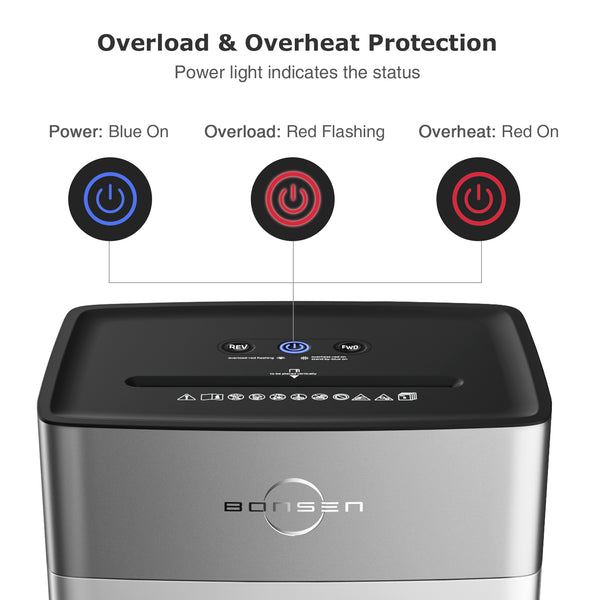
Lights tell you exactly what’s wrong. Learn these patterns to skip guesswork.
Flashing Power Light
This means the bin is full or misaligned. Empty the bin completely. Wipe the sensor area on the bin and housing with a dry cloth. Reinsert the bin until it clicks. If the light still flashes, the bin-full sensor may be faulty. Test by running without the bin if safe per model. If it powers on, the sensor needs cleaning or replacement.
Flashing Overheat Light
Stop all use. The motor is too hot. Unplug and wait 30 to 60 minutes. Do not force operation. After cooling, plug in and test. If the light flashes again immediately, the thermal fuse may be damaged. This is irreversible. Replace the unit.
Flashing Overload Light
You’ve inserted too many sheets. Remove paper and reduce load. Bonsen models typically handle 6 to 12 sheets depending on thickness. If overloading happens often, the feed rollers may be worn. Clean them with a dry cloth to restore grip.
All Lights Off But Plugged In
No lights mean no power delivery. Check the outlet, reset the breaker, and verify the back switch is on. If all are good, the internal fuse may be blown. Some models allow user-replacement. Check the manual. If not, contact support.
Prevent Future Issues

Avoid breakdowns with simple habits. A well-maintained Bonsen shredder lasts years.
Clean After Every Use
After shredding, unplug and wipe the feed slot with a dry cloth. Use tweezers to remove stray paper. Vacuum the bin compartment monthly to clear dust from sensors and gears. A clean unit runs quieter and jams less.
Lubricate Regularly
Oil is preventive medicine. Shred a lubrication sheet or apply oil every 15 to 20 minutes of continuous use. If you notice slowing or noise, oil immediately. This extends blade life and reduces motor strain.
Follow Usage Rules
Respect the duty cycle. Shred 2 to 5 minutes, then rest 30 to 60 minutes. Never force thick stacks. Avoid staples, paper clips, or plastic unless your model is labeled staple-safe. These materials dull blades and cause jams.
When to Repair or Replace
Most issues are fixable. But some mean it’s time for a new unit.
Repairable Issues
These problems typically respond to home troubleshooting. A stuck safety switch can be freed by pressing the interlock button multiple times. Clogged or dirty sensors respond to dry cloth cleaning and vacuuming. A blown fuse, if accessible, can be user-replaced on some models. A minor jam often resolves with lubrication and reverse function use. If under warranty, Bonsen offers 1-year coverage. Contact support@bonsaii.com. They may send replacement parts or a new unit.
Replace, Do Not Repair
Some failures indicate permanent damage. Motor failure with a burning smell means the motor is cooked. Smoke or melted components are safety hazards. Stripped gears or broken circuit boards cannot be cost-effectively repaired. Repair costs often exceed the price of a new Bonsen shredder. If it’s over a year old and fails after all troubleshooting, replacement is smarter.
Special Case: Bonsen S3201 Fixes
The S3201 model is prone to jams and overheating. When stuck, follow this sequence. Unplug for 15 to 20 minutes to reset thermal protection. Apply oil to blades. Wait 5 minutes. Use reverse function with rocking motion. Clean sensor and bin interlock. This sequence resolves 80% of S3201 failures.
Frequently Asked Questions About Bonsen Paper Shredder Troubleshooting
Why does my Bonsen shredder not turn on even though it’s plugged in?
Check the outlet first. Plug in a different device to confirm the outlet works. Then check the power switch on the back of the unit. Make sure it’s in the ON position. If the outlet and switch are fine, the thermal protection may be tripped. Unplug and wait 30 to 60 minutes. Also verify the waste bin is fully seated. A misaligned bin triggers the safety interlock.
How do I fix a paper jam in my Bonsen shredder?
Always unplug first. Set the mode to REV (Reverse). While holding reverse, gently pull the paper upward. If it doesn’t budge, rock the switch between REV, OFF, REV every 2 to 3 seconds. For stubborn jams, apply 3 to 5 drops of shredder oil or vegetable oil to the blades. Wait 5 minutes, then try reverse again. Use tweezers only if paper is visibly exposed.
What does a flashing overheat light mean on my Bonsen shredder?
A flashing overheat light means the motor has exceeded safe temperature limits. Stop shredding immediately. Unplug the unit and let it cool for 30 to 60 minutes. Do not force operation during cooling. After the wait, plug it back in and test with one sheet. If the light flashes again right away, the thermal fuse may be damaged and the unit needs replacement.
Can I use regular oil to lubricate my Bonsen shredder?
Yes, plain vegetable oil works as a substitute if shredder-specific oil is unavailable. Drip 3 to 5 drops across the cutter teeth. Let it sit for 5 minutes to penetrate debris. Then run the shredder in reverse for a few seconds, followed by auto-shredding 2 to 3 scrap sheets. This distributes oil and absorbs excess. Lubricate every 15 to 30 minutes of continuous use.
Why does my shredder run continuously without paper?
This indicates a blocked or faulty feed sensor. Unplug the unit. Use a dry cloth or soft brush to wipe the center of the feed chute. Vacuum around the sensor eyes to remove dust. If the problem persists, try feeding cardboard or a paper towel into the side edges of the slot. Some models trigger on side sensors. If nothing works, the sensor may need replacement.
How do I contact Bonsen support for warranty claims?
Bonsen shredders come with a 1-year free warranty. For support, email support@bonsaii.com. Include your model number and a description of the problem. They may send replacement parts or arrange for a new unit. Have your purchase date ready. Warranty claims require proof of purchase.
Key Takeaways for Troubleshooting Your Bonsen Shredder
Most Bonsen paper shredder troubleshooting comes down to three core fixes. First, power issues almost always resolve with a thermal reset. Unplug and wait 30 to 60 minutes after overheating. Second, paper jams clear fastest with lubrication. Apply oil, wait 5 minutes, then use the reverse function with a rocking motion. Third, sensor problems vanish with dry cleaning. Wipe the feed chute with a dry cloth and vacuum dust.
Always unplug before servicing your shredder. Never force paper out. Use the reverse function instead. Respect the duty cycle. Shred 2 to 5 minutes, then rest. This prevents 90% of overheating failures. Lubricate every 15 to 30 minutes of use to keep blades sharp and gears quiet.
If your unit smells burning, smokes, or shows melted components, stop immediately. These are signs of permanent damage. Do not attempt repair. Contact Bonsen support or replace the unit. By following this guide, you’ll keep your shredder running like new without costly repairs.





