Every year, millions of people fall victim to identity theft, often because sensitive documents like bank statements, tax forms, or medical records were discarded without proper destruction. Simply tossing papers in the trash leaves you exposed. The California v. Greenwood Supreme Court ruling confirmed it: once your garbage is on the curb, it’s no longer protected by privacy laws. That’s why knowing how to choose a paper shredder is more than a convenience, it’s a critical step in protecting your personal and financial information.
With models ranging from compact desktop units under $50 to high-security auto-feed shredders over $300, selecting the right one can feel overwhelming. But the decision boils down to four key factors: security level, capacity, features, and budget. This guide cuts through the noise by breaking down everything you need to know. You’ll learn which cut style truly protects your data, how many sheets you actually need to shred at once, what features prevent jams and protect kids, and which models deliver the best value for home, office, or business use.
Match Security Level to Your Risk Level

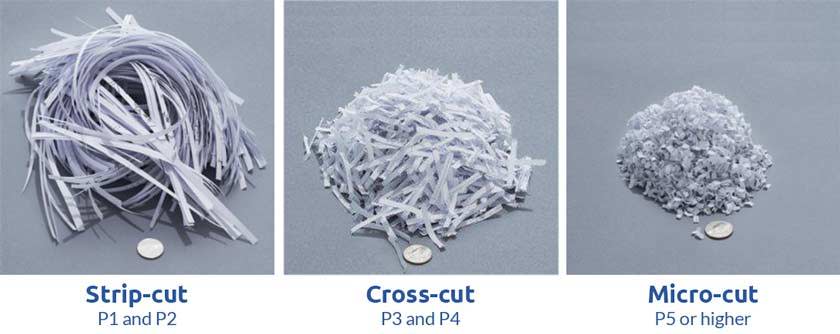
Your shredder’s cut style determines how hard it is for someone to reconstruct shredded documents. Not all shredders offer the same protection. The international P-rating system classifies security levels based on particle size and data reconstruction difficulty.
Strip-Cut: Minimal Protection (P-2)
Strip-cut shredders slice paper into long vertical strips, about 40 pieces per page. While fast and high-capacity, these strips can be reassembled like a puzzle, especially if text runs across them.
• Best for: Junk mail, expired coupons, non-sensitive printouts
• Avoid for: Bank statements, IDs, medical records
• Reality check: Strip-cut models are fading from the market due to low security and rising demand for cross-cut alternatives
Never use a strip-cut shredder for any document with your name, address, account number, or Social Security number.
Cross-Cut: Everyday Security (P-3 to P-4)
Cross-cut shredders slice paper both vertically and horizontally, producing small rectangular confetti, around 200 to 400 pieces per page. This makes reconstruction extremely difficult without specialized tools.
• Security rating: P-3 (200+ pieces) to P-4 (400+ pieces)
• Best for: Home offices, small businesses, personal tax documents, emails, invoices
• Example: The OfficeAssist M100 offers P-4 security, handling 10 sheets at once with a 6-gallon bin
Smaller particles mean less bin volume per page, reducing emptying frequency and increasing data safety.
Micro-Cut: High Security (P-5 to P-6)
Micro-cut shredders turn paper into tiny, dust-like particles, up to 2,000 pieces per page. This is the gold standard for sensitive personal and business data.
• Security rating: P-5 (2,000+ pieces), P-6 (even finer)
• Best for: Financial records, legal contracts, medical files, HR documents
• Ideal user: Accountants, lawyers, freelancers handling client data, privacy-conscious homeowners
For most home offices, P-5 micro-cut is the sweet spot, offering near-military-grade security without the cost of P-7.
High Security: Top Secret (P-7)
Used by government agencies like the FBI and military, P-7 shredders produce an estimated 15,600 particles per page, turning documents into near-invisible dust.
• Security profile: Virtually impossible to reconstruct
• Best for: Classified government data, military operations, ultra-sensitive R&D documents
• Reality: Overkill for home or small business use; these units are expensive and require strict maintenance
If your job involves handling classified information, only use P-7 certified shredders as mandated by law.
Choose the Right Capacity for Your Volume
Choosing a shredder that’s too small leads to frustration. Too large, and you waste money and space. Match capacity to your shredding volume and frequency.
Personal Use: Up to 12 Sheets
For individuals or light home office use, look for these specifications:
• Sheet capacity: 4 to 12 sheets per pass
• Continuous runtime: About 10 minutes before cool-down
• Bin size: 1.3 to 2 gallons
• Best models: Aurora AS420C (4-sheet), Fellowes LX200 (12-sheet)
Shredding 50 pages takes about 5 to 7 minutes on a 10-sheet cross-cut model.
SOHO: Up to 18 Sheets
For small offices or shared workspaces:
• Sheet capacity: 10 to 18 sheets
• Runtime: Up to 30 minutes continuous
• Bin size: 3 to 5 gallons
• Best models: Fellowes LX200, Aurora AU120MA
If multiple people use the shredder, choose one with a 5-gallon bin to reduce emptying frequency.
Commercial Grade: 30+ Sheets
For high-volume environments:
• Sheet capacity: 30+ sheets manually, up to 600 sheets with auto-feed
• Runtime: Extended cycles with fast cool-down
• Bin size: 5 to 8 gallons
• Best models: OfficeAssist A6000-HS (600-sheet auto-feed), A1500-HS (150-sheet)
Auto-feed models save hours. The A6000-HS can process an entire stack while you work with no manual feeding required.
Understand How Cut Style Affects Bin Capacity
Many shoppers focus only on bin capacity, but cut style affects how much you can actually store before emptying.
| Cut Type | Particles Per Page | Bin Efficiency | Emptying Frequency |
|---|---|---|---|
| Strip-Cut | About 40 | Low | Every 1 to 2 weeks |
| Cross-Cut | About 200 | Medium | Every 3 to 4 weeks |
| Micro-Cut | About 2,000 | High | Every 6+ weeks |
A 5-gallon micro-cut shredder holds the equivalent of 10-plus gallons of strip-cut waste due to particle density.
Also consider these physical factors:
• Desktop models: Compact, fit on shelves but slower
• Floor models: Taller (up to 23 inches), higher capacity, often include wheels
• Pull-out bins: Easier to empty without spilling
Prevent Jams with Smart Features
Jams are the number one frustration with paper shredders. The right features can prevent them or fix them automatically.
Auto-Reverse: Stop Jams Before They Stall
Advanced models like the Fellowes Intellibar detect resistance and instantly reverse the motor to clear paper before a full jam occurs.
• How it works: Sensors detect paper feed irregularities
• Benefit: No need to open the unit or use tools
• Models: Fellowes LX200, Aurora AU120MA
Forcing too many sheets or crumpled paper causes 80% of jams. Always feed flat, straight paper.
Overheat Protection: Prevent Motor Burnout
Shredders have limits. After 10 to 30 minutes of continuous use (depending on model), they automatically shut off to cool down.
• Cool-down time: Typically 30 to 60 minutes
• Indicator lights: Warn when nearing heat limit
Shred in batches to avoid downtime during heavy sessions.
Protect Kids and Pets with Safety Technology

If you have children or pets, safety should be a top priority.
Safe Sense: Hands-Free Shutdown
Found in Fellowes LX200 and similar models, Safe Sense stops the shredder instantly if fingers or objects come near the paper slot.
• How it works: Infrared sensors detect proximity
• Benefit: Prevents accidental injury
• Ideal for: Homes with toddlers, curious pets, or shared workspaces
Security Locks: Prevent Unauthorized Use
Some high-end models include 4-digit PIN locks to disable the shredder when not in use.
• Best for: Offices, shared spaces, or households with multiple users
• Example: OfficeAssist A6000-HS
Shred More Than Paper: CD, Credit Cards, and Staples
Many shredders handle more than just documents, but not all. Always verify compatibility.
What Can Be Shredded?
• Credit cards: Yes, most models
• CDs and DVDs: Yes, select models only (Aurora AU120MA cannot, Amazon Basics 8 Sheet can)
• Staples: Yes, cross-cut and micro-cut models
• Paper clips: Sometimes, remove if not specified
• Envelopes: Yes, remove plastic windows if possible
Shredding incompatible materials can dull blades or damage motors. Check the manual first.
Maintain Performance with Simple Care
A well-maintained shredder lasts years. Neglect leads to jams, dull blades, and early failure.
Oil Regularly, Especially Cross-Cut Models
Blades in cross-cut and micro-cut shredders need lubrication to stay sharp and prevent friction.
• Frequency: Every 15 to 20 minutes of use or after 500 to 1,000 sheets
• Product: Use shredder oil only (not WD-40 or vegetable oil)
• Method: Spray or pour a few drops, then run paper through
Buy a combo kit with oil and cleaning wipes. Many brands offer them at reasonable prices.
Clean the Blades and Bin
Paper dust builds up and causes jams.
• Use: Dedicated shredder cleaning wipes
• Process: Turn off shredder, insert wipe, let it pull through
• Bin cleaning: Empty regularly, wipe with dry cloth
Never use water or wet cloths inside the machine. Moisture damages motors and electronics.
Compare Top Models by Use Case

Not all shredders are created equal. Here’s how top models stack up.
Best Overall: Aurora AU120MA
• Price: $225
• Security: Micro-cut (P-5)
• Capacity: 120-sheet auto-feed (tests show 140)
• Speed: 36 sheets per minute
• Bin: 5 gallons
• Noise: Low (9 out of 10)
Pros include fast operation, quiet performance, high security, and auto-feed capability. Cons include no CD shredding and bulky form factor. Best for home offices needing high-volume, secure shredding.
Best Value: Amazon Basics 8 Sheet Micro-Cut
• Price: $68
• Security: Micro-cut (P-5)
• Capacity: 8 sheets (tests show 11)
• Bin: 4 gallons
• Features: Shreds paper, credit cards, CDs
Pros include affordable high security and multi-material capability. Cons include slow speed and large footprint for a desktop unit. Best for budget-conscious users who need real security.
Best Desktop: Aurora AS420C
• Price: $43
• Security: Cross-cut (P-3)
• Capacity: 4 sheets
• Bin: 1.32 gallons
• Size: Fits on any desk
Pros include low cost, quiet operation, and compact design. Cons include very slow performance and low power. Best for occasional use, tight spaces, and minimal budgets.
Best Personal: Fellowes LX200
• Price: Mid-range
• Security: Cross-cut
• Capacity: 12 sheets
• Features: Intellibar anti-jam, Safe Sense safety, efficiency meter, bin full alert
Best for families, home offices, and safety-first users.
Follow the Decision Framework
Use this four-step checklist to pick the right shredder fast.
Step 1: Ask What Are You Shredding
| Document Type | Minimum Security |
|---|---|
| Junk mail, ads | Strip-cut (not recommended) |
| Personal letters, emails | Cross-cut (P-3) |
| Bank statements, IDs | Micro-cut (P-5) |
| Tax returns, medical files | Micro-cut (P-5/P-6) |
| Legal contracts, client data | Micro-cut (P-5/P-6) |
Step 2: Estimate Your Volume
• Fewer than 50 pages per month: 4 to 8 sheet shredder
• 50 to 200 pages per month: 10 to 12 sheet model, 3 to 5 gallon bin
• More than 200 pages per month: 15-plus sheet or auto-feed model
Step 3: Check Your Space and Needs
• Limited desk space: Compact desktop model
• Floor space available: Floor-standing with wheels
• Kids or pets in the home: Safe Sense or lock features
• Need to shred CDs or credit cards: Verify multi-material support
Step 4: Set a Realistic Budget
| Use Case | Budget Range | Recommended Features |
|---|---|---|
| Light personal | $40 to $70 | Cross-cut, 4 to 8 sheets |
| Home office | $70 to $150 | Micro-cut, 10-plus sheets, anti-jam |
| Small business | $150 to $250 | Auto-feed, 5-gallon bin, micro-cut |
| High-volume office | $250-plus | 30-plus sheets, 600-sheet auto-feed, P-5/P-6 |
Spend more upfront for a durable, high-security model. A $200 shredder that lasts 10 years beats replacing three $60 models.
Meet Legal and Privacy Requirements
In many regions, proper document destruction is not optional, it is the law.
PIPEDA: Canada
Under the Personal Information Protection and Electronic Documents Act, businesses must securely destroy personal information including financial records, health data, client files, and employee information. Use at least micro-cut (P-5) for business records.
United States: FTC and HIPAA
While the U.S. lacks a federal shredding law, agencies recommend shredding any paper with personal information to prevent identity theft. Medical practices must use cross-cut or higher for patient records under HIPAA.
If you handle client data, assume you need P-5 security.
Frequently Asked Questions About Choosing a Paper Shredder
What security level do I need for home use?
For home use, cross-cut (P-3 or P-4) is sufficient for everyday documents like bills and correspondence. If you shred bank statements, tax forms, or medical records, upgrade to micro-cut (P-5) for better protection.
How often should I oil my shredder?
Oil cross-cut and micro-cut shredders every 15 to 20 minutes of use or after shredding 500 to 1,000 sheets. Strip-cut models require less frequent oiling.
Can I shred credit cards and CDs in any shredder?
No. Not all shredders handle credit cards and optical media. Check the manufacturer’s specifications. Models like Amazon Basics 8 Sheet support both, while others like Aurora AU120MA handle paper only.
What causes paper jams most often?
Forcing too many sheets at once is the number one cause of jams. Feeding crumpled paper, thick cardstock, or materials the machine is not designed for also causes problems. Always feed flat, straight paper within the rated capacity.
How long do paper shredders typically last?
With proper maintenance (regular oiling and cleaning), a quality shredder can last 5 to 10 years. Cheaper models may need replacement after 2 to 3 years.
Key Takeaways for Choosing Your Paper Shredder
Choosing the right paper shredder is not about buying the cheapest or fastest model. It is about matching security, capacity, and features to your actual needs. Start by assessing what you are shredding. If it contains any personal, financial, or medical information, choose micro-cut (P-5) for peace of right. Next, size up based on your monthly volume. A personal shredder handles occasional use, while auto-feed models save hours for high-volume offices.
Protect your investment with regular maintenance. Oil the blades, clean the bin, and avoid overloading the machine. If children or pets are in your home, prioritize safety features like Safe Sense technology. Whether you are a student tossing old notes or a small business owner handling client contracts, there is a shredder that fits. Invest in real security, maintain it properly, and rest easy knowing your sensitive data stays destroyed for good.