
Is your Fellowes paper shredder not working when you press start or insert paper? You’re not alone. Whether it’s failing to turn on, not auto-feeding, jamming mid-cycle, or making strange noises, these issues are common but often fixable without replacement. This guide cuts through the confusion with step-by-step solutions based on real repair data from models like the P35C, 8C, and T7CM.
Most problems stem from sensor misalignment, paper jams, overheating, or electrical lockouts, not permanent motor failure. In fact, over 70% of “dead” shredders can be revived with a reset, realignment, or simple cleaning. You’ll learn how to diagnose the exact cause, perform safe repairs, and prevent future breakdowns.
Perform a Hard Power Reset
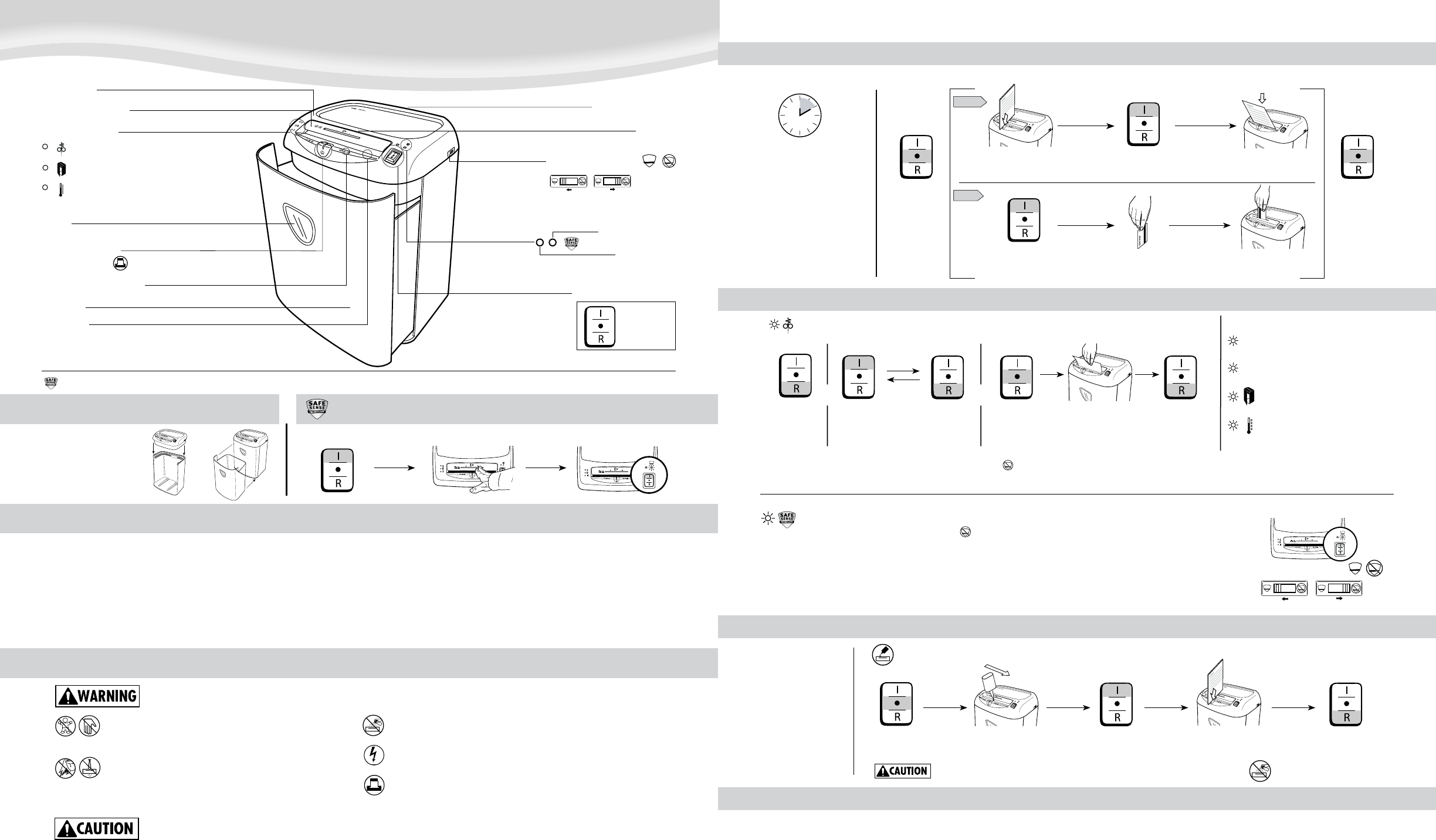
When your Fellowes shredder shows no lights or won’t restart after a jam, don’t assume it’s broken. The internal safety system may have locked out the motor.
Unplug for 10 Minutes
Many models like the Fellowes 8C have electronic control boards that trigger a safety shutdown after jams or overuse. A full power cycle resets this lockout.
- Unplug the shredder from the wall.
- Wait at least 10 minutes to allow capacitors to discharge and the board to reset.
- Plug it back in and test using the manual forward mode.
Pro Tip: Always try this first. It fixes non-starting issues in over half of reported cases.
Check the Wall Outlet
If there’s still no response, test the outlet with another device like a lamp. Try a different outlet to rule out circuit issues. Ensure the power cord is fully seated into both the wall and the shredder base.
Inspect the Power Switch
A stuck or faulty switch prevents power delivery. If the switch feels loose, rigid, or doesn’t click, the internal switch mechanism may be damaged. This often requires opening the unit to access or replace the switch or motherboard.
Verify Safety Interlock Is Engaged
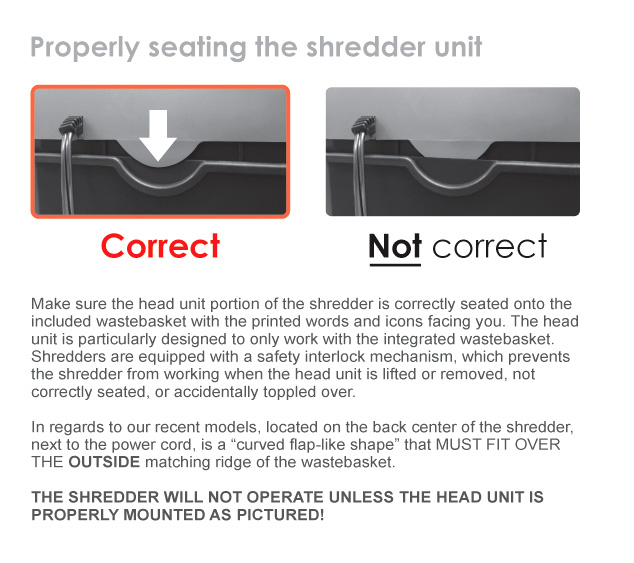
Your Fellowes shredder won’t run unless it detects the bin is properly seated. This safety feature stops operation if the head is lifted.
Reattach the Shredder Head
- Remove the shredder head from the bin.
- Empty the bin if full because overflow can block proper seating.
- Align the head carefully and press down firmly until it clicks.
Visual Cue: Look for a small plastic tab or switch on the bottom of the head that should depress when seated. If the unit works only when tilted or pressed down, the interlock switch is likely misaligned or dirty.
Fix Auto-Feed Detection Failures

If your shredder has power but won’t start when you insert paper, the auto-feed sensor is likely the culprit, not a jam.
Locate the Trigger Switch (P35C)
In the Fellowes P35C, a small paper detection switch activates when paper enters the feed slot. The switch connects to a pulley system that moves with inserted paper. If the pulley slips or the switch shifts out of position, it won’t trigger the motor.
Realign the Pulley and Switch
- Power off and unplug the unit.
- Remove six screws from the back panel to open the housing.
- Find the trigger switch and pulley near the feed throat.
- Ensure the pulley arm makes contact with the switch when paper is inserted.
- Reposition or reseat the switch if displaced.
Success Signal: After reassembly, a single sheet should activate auto-shred instantly.
Replace the White Plastic Wedge (T7CM)
The Fellowes T7CM uses a white plastic wedge in the feed slot that compresses to signal the motor. If the wedge is stuck, broken, or fails to spring back, the sensor won’t trigger. A damaged internal spring can also prevent activation.
Solution: If cleaning doesn’t restore movement, replace the entire feeding sensor assembly. Do not force paper through because this can damage internal gears.
Clear Jams and Hidden Obstructions

A jammed shredder may hum, stall, or reverse abnormally. Even after clearing visible paper, tiny fragments can block sensors or blades.
Use Reverse Mode First
- Switch to Reverse if available.
- Press and hold for 3 to 5 seconds to eject stuck material.
- Switch to Off, then try Forward.
If reverse fails, proceed to manual removal.
Remove Trapped Paper Manually
- Unplug the unit.
- Shine a flashlight into the cutting head.
- Use tweezers or needle-nose pliers to extract paper scraps.
- Gently pull in the direction of the blades, never force backward.
Warning: Never use fingers because blades are sharp even when off.
Inspect for Credit Card or Staple Damage
Inserting too many credit cards or stapled documents can strip gears, bend the drive shaft, or cause grinding noises. Signs of mechanical damage include motor running but blades not turning, loud grinding or shrieking, and uneven blade movement.
Diagnose Motor and Gear Failures

If the shredder hums but doesn’t cut, or makes noise without motion, internal mechanical damage may be present.
Motor Runs, Blades Don’t Turn
This indicates a broken gear or disconnected drive system.
- Open the gear housing after unplugging.
- Inspect plastic gears for cracks or stripped teeth.
- Replace any damaged gear because OEM parts ensure compatibility.
Prevention Tip: Never exceed sheet capacity because overloading is the top cause of gear failure.
Bent Drive Shaft Symptoms
A bent shaft causes high-pitched screeching, intermittent cutting, and vibration during operation. Repair options include trying to gently straighten the shaft with pliers if accessible, or replacing the shaft or motor unit if noise persists.
Smoke or Burning Smell
Stop immediately because smoke means electrical short, motor burnout, or severe internal friction.
- Unplug and wait 30 minutes to cool.
- After cooling, open the casing.
- Look for burnt wires, melted insulation, or discolored motor windings.
Critical Warning: Do not reuse the shredder if smoke returns on restart because the motor needs replacement.
Address Overheating and Duty Cycles
Fellowes shredders are designed for short bursts, not continuous use. Overheating triggers automatic shutdown.
Follow the 3-Minute Rule
Run time maximum is 3 minutes continuous. A cool-down of 5 minutes is required before next use. Exceeding this cycle trips the thermal protector.
Reset After Overheating
- Turn off and unplug.
- Wait 5 to 10 minutes for internal cooling.
- Try again in short bursts.
Never bypass the cool-down period because repeated overheating kills motors.
Re-Lubricate the Blades
Low oil equals high friction equals excess heat.
- Let the unit cool completely.
- Apply shredder oil directly to the blade entry.
- Run in Auto or Forward mode for 30 seconds without paper.
- Oil weekly or every 15 to 20 minutes of use.
Pro Tip: Always oil before turning off because this ensures oil penetrates while blades are moving.
Prevent Future Failures
Most shredder problems are avoidable with routine care and proper use.
Weekly Lubrication Routine
- Use quality shredder oil, not WD-40.
- Spray across the feed opening.
- Run the machine forward for 30 seconds.
- Wipe excess oil from housing.
Result: Smoother operation, fewer jams, and cooler running.
Clean Sensors Monthly
Dust and paper dust buildup can fool sensors into thinking no paper is present.
- Power off and unplug.
- Wipe the feed slot and sensor area with a dry, lint-free cloth.
- Avoid liquids because they can damage electronics.
Respect Capacity Limits
P35C handles up to 10 sheets per pass. 8C handles 8 to 10 sheets. T7CM handles 12 sheets or 3 credit cards at once. Exceeding limits causes jams, gear strain, and motor burnout.
When to Replace Parts
Some failures require component replacement, not just cleaning or resetting.
Replace the Feeding Sensor Assembly
If the auto-feed still fails after realignment, the internal spring or switch is likely broken. Order the OEM feeding sensor assembly for your model.
Models Affected: T7CM, P35C, and similar auto-feed units.
Swap Out the Power Switch or Motherboard
If the unit shows no signs of life and the outlet is confirmed working, the switch may be fused or broken. If the switch is integrated into the motherboard, replace the entire board.
Install a New Motor Unit
For persistent humming, smoke, or no blade movement, replace the motor and shaft assembly. Match the model number exactly, for example, 30138 motor for T7CM.
Key Takeaways for Fixing Your Fellowes Shredder
A Fellowes paper shredder not working doesn’t mean it’s dead. Most issues are fixable with simple steps. First, try a 10-minute hard reset because it solves many power issues. Second, check bin seating and safety interlock because a loose fit stops operation. Third, clean jams and sensor areas because hidden debris blocks restarts. Fourth, realign the trigger switch or replace the white wedge for auto-feed failures. Fifth, lubricate weekly to prevent overheating and jams. Sixth, respect duty cycles, 3 minutes on and 5 minutes off.
By following these model-specific fixes, you can revive your P35C, 8C, or T7CM shredder and extend its life for years. Save your receipt and keep OEM parts on hand because smart maintenance beats replacement every time.
Frequently Asked Questions About Fellowes Paper Shredder Not Working
Why won’t my Fellowes shredder turn on at all?
Start with a 10-minute hard reset by unplugging the unit and waiting for capacitors to discharge. Check the wall outlet with another device to confirm power. Inspect the power switch for stiffness or damage. Verify the shredder head is properly seated on the bin because the safety interlock prevents operation when detached.
How do I fix auto-feed not working on my Fellowes P35C?
Open the back panel by removing six screws. Locate the trigger switch and pulley system near the feed throat. Ensure the pulley makes contact with the switch when paper is inserted. Realign or reseat any displaced components. Test with a single sheet after reassembly.
What causes a Fellowes shredder to overheat and stop?
Exceeding the 3-minute continuous run time triggers thermal shutdown. Low lubrication increases blade friction and heat generation. Weekly oiling with quality shredder oil prevents this. Allow 5 minutes cool-down before resuming operation.
Can I fix a bent drive shaft on my shredder?
Try gently straightening the shaft with pliers if accessible. If the high-pitched screeching or vibration persists, replace the entire shaft or motor unit. This damage typically occurs from overloading beyond sheet capacity limits.
When should I replace my Fellowes shredder instead of repairing it?
Replace the unit if smoke appears and persists after cooling, if the motor runs but blades don’t turn due to stripped gears you cannot access, or if replacement parts like the motor assembly cost more than a new shredder. Otherwise, most common issues respond to reset, cleaning, or sensor realignment.





