You’re standing at your desk with a stack of flyers that need trimming. Scissors would take forever, and the edges would look uneven. A paper cutter solves both problems in seconds. But how does a paper cutter work in a way that makes it so much more efficient than hand cutting? The answer lies in a clever combination of physics, sharp blades, and mechanical precision.
Understanding the inner workings of a paper cutter helps you choose the right model, use it safely, and maintain it for years. In this guide, you’ll learn the core components, the different types of cutters, the step by step cutting process, and how to troubleshoot common issues.
Core Components of a Paper Cutter
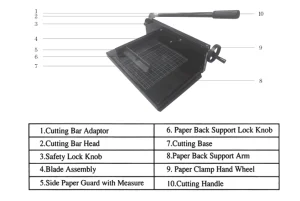
Every paper cutter, whether a simple office trimmer or a heavy-duty industrial model, relies on the same fundamental parts. Each component plays a specific role in producing clean, accurate cuts.
The Blade and Its Cutting Angle
The blade is the heart of any paper cutter. Most blades are made from hardened steel and feature a beveled edge, typically angled between 20 and 25 degrees. This angle concentrates force along a narrow line, allowing the blade to slice through paper fibers cleanly rather than crushing them.
In manual models, the blade is often referred to as a guillotine blade, named for its straight downward motion. In electric cutters, the blade is driven by a motor that delivers consistent pressure with each cycle.
The Paper Clamp or Pressure Bar
Before any cutting happens, the paper must be held completely still. The paper clamp, also called a pressure bar, presses down on the stack to prevent shifting during the cut. Without this clamp, even a small movement could cause the paper to slip and result in crooked or uneven edges.
Higher-end models distribute pressure evenly across the entire width of the stack, which is especially important when cutting large or thick bundles.
The Back Gauge and Measurement Scale
Accuracy begins with proper alignment. The back gauge is an adjustable stop located at the rear of the cutting bed. You press the edge of your paper against it to ensure every cut is the same size.
Most gauges include a printed measurement scale marked in both inches and centimeters. Some professional models feature digital displays that allow for micro adjustments measured to the fraction of a millimeter.
The Cutting Bed and Cutting Stick
The cutting bed is the flat surface that supports the paper during the cut. It’s typically made from wood, plastic, or a self-healing composite material designed to withstand repeated blade contact.
Beneath the blade path sits the cutting stick, a replaceable strip that absorbs the impact of each cut. Over time, this stick develops grooves and should be replaced to maintain clean cuts and protect the blade from dulling prematurely.
Types of Paper Cutters and How They Differ
Paper cutters come in several designs, each suited to different tasks and sheet capacities. The type you choose affects how the cutting force is applied and how much paper you can cut at once.
Manual Guillotine Cutters
The manual guillotine is the most familiar design, commonly found in offices, schools, and copy rooms. It uses a lever arm system: you raise the handle, position the paper, and bring the blade down in one controlled motion.
The blade follows a fixed track, which keeps the cut perfectly straight. Your arm provides the force, while the blade’s weight assists the downward stroke. Most manual guillotines handle between 10 and 20 sheets per cut, depending on paper weight and blade condition.
Pro Tip: Lower the blade in a single smooth motion. Stopping mid-cut can tear the paper or leave a jagged edge.
Rotary Trimmers
Rotary trimmers replace the vertical blade with a small circular blade that rolls along a fixed rail. You push the blade carriage across the paper by hand, and the rolling action slices through the material.
This design is quieter and requires less force than a guillotine, making it popular for trimming photos, art prints, and delicate papers. However, rotary trimmers are best suited for thin stacks, typically no more than 5 to 10 sheets at a time.
Electric and Hydraulic Cutters
In print shops and production environments, electric and hydraulic paper cutters handle high-volume work. You program the desired dimensions, place the paper, and the machine does the rest.
A motor drives the blade down with calibrated pressure, capable of slicing through 100 or more sheets in a single pass. Many models include safety sensors, automatic clamps, and programmable memory for repeated jobs. Hydraulic systems use fluid pressure to multiply force, allowing even thicker stacks to be cut with minimal operator effort.
The Cutting Process Explained Step by Step
Now that you know the parts and the types, here is how a paper cutter actually performs its job from start to finish.
Step 1: Align and Secure the Paper
Place your stack against the back gauge and make sure all edges are flush. Then engage the paper clamp to hold the stack firmly in place. On manual cutters, you press the clamp down by hand. On electric models, the clamp may lower automatically.
Any slippage at this stage will throw off the entire cut, so take a moment to verify alignment.
Step 2: Position the Blade
For guillotine and electric models, the blade is already aligned vertically above the cutting line. For rotary trimmers, slide the blade carriage to the desired position on the scale. Always double-check the measurement before proceeding.
Step 3: Execute the Cut
On a manual guillotine, lift the handle fully and bring it down in a steady, controlled motion. Let gravity and the blade’s weight do most of the work. Forcing the cut can bend the blade or produce uneven results.
On a rotary trimmer, apply light pressure and push the blade smoothly from one end of the rail to the other. Electric cutters activate with a button or foot pedal once the safety checks are satisfied.
Visual Cue: A clean cut produces a crisp edge with no fraying, tearing, or lifted fibers.
Why the Guillotine Design Is So Effective

The guillotine-style cutter has remained popular for centuries because its design maximizes efficiency through basic physics.
Leverage and Mechanical Advantage
The long handle acts as a lever, multiplying the force you apply. A small push on the handle translates into significant pressure at the blade, which is why even a lightweight manual cutter can slice through a thick stack.
Shear Cutting Action
A sharp guillotine blade does not crush paper. Instead, it uses shear force: as the blade descends, it first contacts the paper at a single point and then progresses across the stack, similar to the way scissors work. This action separates fibers cleanly rather than compressing them.
Safety Features Every Paper Cutter Should Have
Paper cutters are powerful tools, and safety should always come first. Modern designs include several features to protect users.
Built-In Guards and Locks
Many cutters include finger guards, transparent shields, or blade locks that prevent accidental contact. Electric models often require two-hand activation or palm sensors that confirm both hands are clear before the blade moves.
Common Mistakes to Avoid
- Overloading the cutter: Exceeding the recommended sheet capacity dulls the blade and increases the risk of jams.
- Skipping the clamp: Always secure the paper before cutting.
- Using a dull blade: A dull blade requires more force, which raises the chance of slipping.
Warning: Keep your fingers and hands clear of the blade path at all times, even on manual models.
How to Maintain Your Paper Cutter
Regular maintenance keeps your cutter performing like new and extends its lifespan.
Cleaning the Bed and Components
Dust, paper fibers, and adhesive residue can accumulate on the cutting bed and back gauge. Wipe these areas weekly with a dry or slightly damp cloth. Avoid harsh chemicals that could damage printed scales or plastic components.
Sharpening or Replacing the Blade
Most blades last for thousands of cuts before needing attention. Signs of a dull blade include ragged edges, increased effort, or incomplete cuts. Some blades can be resharpened by a professional, while others must be replaced entirely.
Inspecting the Clamp and Guide Rail
Make sure the clamp moves smoothly and applies even pressure. Check the guide rail for debris, dents, or bending. A misaligned rail causes uneven cuts and accelerates blade wear.
Choosing the Right Paper Cutter for Your Needs
The best paper cutter for you depends on how often you cut and how much paper you handle at once.
For Home and Office Use
A manual guillotine or rotary trimmer is usually sufficient. Look for a model with a clear measurement scale, a sturdy base, and a safety lock. Sheet capacity of 5 to 15 sheets is typical for this category.
For Professional and Industrial Use
Consider an electric or hydraulic cutter with a higher sheet capacity, digital controls, and durable construction. These machines handle repetitive, high-volume cutting with consistent precision and minimal operator fatigue.
Key Features to Look For
- A non-slip base to prevent movement during use
- Self-sharpening blades on select electric models
- Both metric and imperial measurement scales
- Replaceable cutting strips for easier maintenance
- Safety interlocks to prevent accidental activation
Troubleshooting Common Paper Cutter Problems
Even well-maintained cutters can develop issues. Here is how to diagnose and fix the most frequent problems.
Ragged or Torn Edges
A dull blade or an overloaded stack is usually the cause. Sharpen or replace the blade, and reduce the number of sheets per cut.
Misaligned Cuts
Paper that is not flush against the back gauge or a loose clamp is the likely culprit. Realign the stack and make sure the clamp is fully engaged before cutting.
Blade Sticking or Jamming
Debris in the guide rail or a bent track can cause the blade to stick. Clean the rail with a soft brush and inspect it for visible damage.
Electric Cutter Not Activating
Blocked safety sensors, a disconnected power supply, or improper hand placement are common causes. Clear any obstructions, verify the power source, and confirm that all safety conditions are met before trying again.
Frequently Asked Questions About Paper Cutters
What is the difference between a paper cutter and a paper trimmer?
The terms are often used interchangeably, but paper cutter usually refers to a guillotine-style machine capable of cutting thicker stacks, while paper trimmer often describes smaller rotary or swing-arm models designed for lighter work.
How many sheets can a paper cutter cut at once?
Capacity depends on the model. Manual guillotines typically handle 10 to 20 sheets, while electric and hydraulic cutters can manage 100 or more sheets per cycle.
Are paper cutters safe for children to use?
Only with close adult supervision. Many models include safety locks, but the blades remain extremely sharp. Choose a rotary trimmer with a covered blade for younger users and always follow the manufacturer’s guidelines.
How often should you replace the cutting stick?
Inspect the cutting stick regularly. If you notice deep grooves, frequent paper jams, or rough cut edges, it is time to replace the strip. For heavy use, replacement every few months is common.
Can you sharpen a paper cutter blade at home?
Sharpening a guillotine blade requires specialized equipment and is best left to professionals. Attempting to sharpen it yourself can result in an uneven edge or personal injury.
What type of paper cutter is best for crafts?
A rotary trimmer is ideal for crafting because it handles lightweight papers, photos, and cardstock with precision. Its rolling blade also reduces the risk of tearing delicate materials.
Key Takeaways on How a Paper Cutter Works
A paper cutter is a precision tool that combines a sharp beveled blade, a secure clamp, an adjustable back gauge, and a supportive cutting bed to deliver fast, accurate cuts. Manual guillotines use leverage and gravity, rotary trimmers use a rolling blade, and electric models automate the process for high-volume tasks.
To get the best results, always align your paper, engage the clamp, and maintain a sharp blade. Choose a cutter that matches your typical workload, and follow basic safety precautions every time you use it.
Ready to put your knowledge to use? Start by inspecting your current paper cutter, or compare a few models to find the one that fits your cutting needs best.