
You’re setting up for a big print job—posters, flyers, or maybe scrapbooking materials—and you need clean, precise cuts. Using scissors or a utility knife just won’t cut it. That’s where paper cutters come in. Whether you’re working in an office, print shop, school, or craft room, choosing the right paper cutter makes all the difference in efficiency, accuracy, and safety. With so many options available, from handheld trimmers to industrial guillotines, it’s easy to feel overwhelmed.
This guide breaks down the main types of paper cutters, explaining how each works, their best uses, and what to consider when selecting one. You’ll learn the strengths and limitations of rotary, guillotine, stack, and hydraulic models, plus niche tools like bench cutters and electric cutters. By the end, you’ll know exactly which type fits your volume, precision needs, and workspace. Let’s dive into the world of paper cutting tools and find the perfect match for your project demands.
Rotary Paper Cutters

Ideal for light-duty tasks, rotary cutters are common in classrooms, home offices, and crafting spaces. They use a rolling circular blade that slices through paper with a guided motion, minimizing ragged edges.
How Rotary Cutters Work
A rotary cutter features a handle with a retractable circular blade that rolls along a metal track or ruler. You position the paper, align it using measurement guides, and pull the blade across in a smooth motion. The enclosed blade reduces accidental cuts, making it safer than open-blade alternatives.
- Best for cutting straight lines or gentle curves
- Handles up to 10 sheets at once depending on paper weight
- Requires minimal maintenance, just blade replacements over time
Pro Tip: Always use a cutting mat underneath to protect surfaces and extend blade life.
When to Choose a Rotary Cutter
Choose this type if you’re doing occasional trimming, photo cropping, or DIY crafts. It’s portable, affordable, and user-friendly, especially for beginners.
Avoid rotary cutters for thick stacks or frequent use. They’re not built for high-volume environments. Also, the blade can dull quickly if used on cardboard or laminated sheets.
Guillotine Paper Cutters
Also known as stack cutters, guillotine cutters use a sharp vertical blade that drops down to slice through multiple sheets at once. They’re a staple in print shops and copy centers.
Manual vs. Self-Healing Guillotines
Manual guillotines require you to press down on a lever to lower the blade. They’re economical and reliable for small to medium workloads.
- Cuts up to 20–30 sheets depending on model and paper thickness
- Features measurement scales and alignment clamps
- Needs regular blade sharpening
Self-healing guillotines have a plastic cutting strip that seals minor cuts, prolonging base life. These are ideal for frequent use where precision matters.
Safety Tips for Guillotine Use
Guillotine cutters are powerful and potentially dangerous. Always:
- Keep fingers behind the safety guard
- Use the clamp to secure paper before cutting
- Store with blade cover in place
Warning: Never bypass safety mechanisms. Serious injuries can occur with improper handling.
Electric Paper Cutters
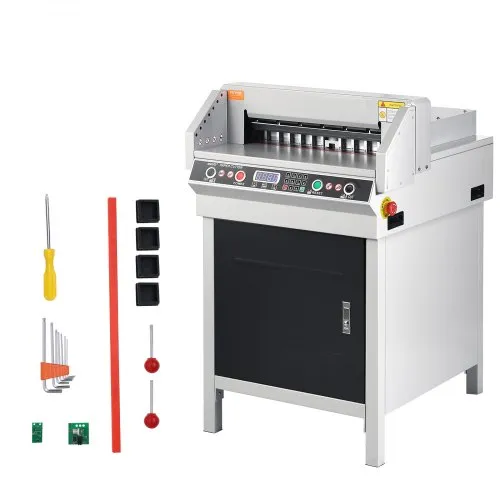
For high-volume environments like binderies or commercial printing, electric cutters save time and reduce physical strain.
Benefits of Automated Cutting
Electric models use motorized blades that cut with the push of a button. Some even allow programmable cuts for repetitive jobs.
- Handles 50+ sheets per cut
- Increases speed and consistency
- Reduces operator fatigue
These are common in offices that produce reports, manuals, or marketing materials daily.
Who Should Use Electric Cutters?
Best for businesses processing large batches of paper. While more expensive, the return on efficiency justifies the cost over time.
Maintenance includes scheduled blade sharpening and cleaning dust from the mechanism. Ensure the unit has emergency stop features for workplace safety compliance.
Hydraulic Paper Cutters
At the top end of the spectrum, hydraulic cutters deliver immense power for industrial applications.
High-Capacity Cutting Performance
Using fluid pressure, these machines drive the blade through thick stacks, handling hundreds of sheets at once. Common in packaging, bookbinding, and large-scale print operations.
- Cuts up to 500 sheets in one pass
- Offers extreme precision with digital measurement displays
- Often includes foot pedals and safety shields
They’re more expensive and require dedicated floor space, but unmatched in throughput.
Maintenance and Operation
Hydraulic systems need regular fluid checks and professional servicing. Operators should be trained to avoid overloading or misalignment, which can damage the blade or cause jams.
Due to size and cost, these are rarely used outside industrial settings.
Bench Paper Cutters
A hybrid between handheld and floor-standing models, bench cutters mount to a work surface and offer stability for frequent use.
Features of Bench-Mounted Units
These cutters combine the precision of guillotine blades with the convenience of a fixed position.
- Ideal for print shops and framing studios
- Often includes a back gauge for repeat cuts
- Can handle cardstock, photo paper, and light board
They’re more durable than tabletop models but less bulky than industrial machines.
Installation and Use
Mount the cutter securely to a sturdy table. Align the blade with the base rule, and always check for loose parts before use. Like other manual cutters, keep the blade clean and sharp for best results.
Specialty and Craft Paper Cutters

Beyond standard models, niche cutters serve specific creative needs.
Die-Cutting Machines
Used in scrapbooking and card-making, die-cutters press shaped dies into paper to create intricate designs.
- Works with steel-rule or thin metal dies
- Hand-crank or digital models available
- Compatible with paper, fabric, and thin foam
Popular brands include Sizzix and Cricut, often paired with electronic cutting machines.
Trimmer and Roller Cutters
Compact trimmers use a small rotary blade for quick edge straightening. Roller cutters, often found in blueprint or wide-format printing, use a rotating blade to slice large rolls of paper or vinyl.
- Trimmers: best for quick fixes and small projects
- Roller cutters: used in architectural or engineering firms
Both prioritize clean, straight-line accuracy on specialized materials.
Choosing the Right Cutter for Your Needs
Not every cutter suits every job. Consider these factors before buying.
Assess Your Volume and Frequency
- Occasional use (home/craft): Rotary or trimmer
- Daily office tasks: Guillotine or electric
- Industrial production: Hydraulic or automated
Match the tool’s capacity to your average workload to avoid burnout or inefficiency.
Consider Precision Requirements
Projects like photo mounting or booklet making demand exact cuts. Look for models with:
- Clear measurement scales
- Adjustable back gauges
- Locking clamps
Digital displays and laser guides add precision in professional setups.
Space and Safety Constraints
Measure your workspace. Floor-standing models need room and anchoring. In shared spaces like schools, prioritize models with:
- Blade guards
- Safety locks
- Rounded edges
Electric and hydraulic units should have emergency stops and certified safety ratings.
Maintenance Tips for Longevity
Extend your cutter’s life with regular care.
Clean After Every Use
Remove paper dust and debris from the cutting bed and blade area. Buildup affects accuracy and accelerates wear.
Use a soft brush or compressed air. Never use water or solvents on mechanical parts.
Sharpen or Replace Blades
Dull blades cause jagged edges and require more force, increasing accident risk.
- Manual cutters: sharpen every 6–12 months
- Electric or hydraulic: professional servicing recommended
Keep spare blades on hand for quick swaps.
Check Alignment Regularly
Misaligned blades lead to uneven cuts. Test by cutting a stack and inspecting both ends. If one side is cleaner, recalibrate according to the manufacturer’s guide.
Frequently Asked Questions About Paper Cutters
What is the safest type of paper cutter for beginners?
Rotary cutters with retractable blades are generally the safest option for beginners. The enclosed blade design reduces the risk of accidental cuts, and they require minimal force to operate. Always use a cutting mat and keep fingers clear of the blade path.
How many sheets can a standard guillotine cutter handle at once?
A manual guillotine cutter typically handles 20–30 sheets per cut, depending on the model and paper thickness. Electric and hydraulic models can handle significantly more, with hydraulic cutters slicing up to 500 sheets in a single pass.
What’s the difference between a guillotine cutter and a stack cutter?
There is no difference. “Guillotine cutter” and “stack cutter” are interchangeable terms that refer to paper cutters using a vertical blade that drops down to slice through multiple sheets. The term “stack cutter” emphasizes their ability to cut through stacks of paper.
Are electric paper cutters worth the investment?
Electric paper cutters are worth the investment for businesses or offices with high-volume cutting needs. They save time, reduce operator fatigue, and deliver consistent results. For occasional home or craft use, a manual cutter is more cost-effective.
How often should I sharpen my paper cutter blades?
Manual paper cutter blades should be sharpened every 6–12 months, depending on usage frequency. Electric and hydraulic models require professional servicing rather than at-home sharpening. Replace blades immediately if you notice jagged cuts or increased resistance.
Can rotary cutters handle thick materials like cardboard?
Rotary cutters are not recommended for thick materials like cardboard or laminated sheets. The blade dulls quickly and the design isn’t built for heavy-duty materials. Use a guillotine or bench cutter for cardstock and similar substrates.
Key Takeaways for Choosing the Right Paper Cutter
Selecting the right paper cutter comes down to matching the tool to your specific needs. Rotary cutters work best for light, occasional tasks, while guillotines handle medium-volume office and print shop jobs with ease. Electric and hydraulic models deliver the speed and power required for high-volume and industrial operations, and bench-mounted units offer a stable middle ground for frequent but moderate use.
Always prioritize safety features, especially in shared or educational environments. Regular maintenance, including cleaning, blade care, and alignment checks, keeps your cutter performing accurately and extends its lifespan. Measure your workspace, define your volume needs, and choose a cutter that fits both your projects and your environment. With the right tool in hand, you’ll achieve clean, professional cuts on every job.